
 MineStrator
Thirteen years after its debut, DayZ has never felt more alive: update 1.29 is live, the Badlands expansion and its desert map Nasdara are announced for 2026, and community servers remain the beating heart of the game. That is where DayZ is really played: on servers run by enthusiasts, each with its own rules, its own map and its own modlist.
This guide walks through the full process of creating a DayZ server in 2026: choosing your map, sizing your plan, configuring loot and wipes, and what to settle before you open the doors to the public.
Why run your own DayZ server?
Because DayZ is a game of rules, and on a public server those rules belong to someone else. Your own dedicated server gives you full control: the map, the difficulty, the loot economy, the mod list, the wipe policy and the tone of the community.
A dedicated server also runs around the clock without depending on your own machine, keeps your personal IP address offline, and gives your players reliable persistence, which matters enormously in a game built on base building and buried stashes. To weigh that against hosting from home, our comparison of self-hosting versus renting a game server covers both approaches in detail.
Choosing your map: Chernarus, Livonia, Sakhal or community?
The map defines your server's identity, so pick it first:
Chernarus: the original map, 230 km² of post-Soviet countryside. The safe starting point, and the one every player already knows.
Livonia: dense forests and wetlands, tighter overall, popular with survival and roleplay servers.
Sakhal: the frozen volcanic archipelago from the Frostline expansion, built around cold-weather survival. This map requires Frostline.
Community maps: Namalsk and others install like mods and deliver radically different, often far harsher experiences.
💬 Good to know: Bohemia has announced the Badlands expansion for 2026, featuring Nasdara, a 267 km² desert map presented as the largest ever built for DayZ. No firm release date has been confirmed, so treat 2026 as a window rather than a promise.
Which plan for your DayZ server?
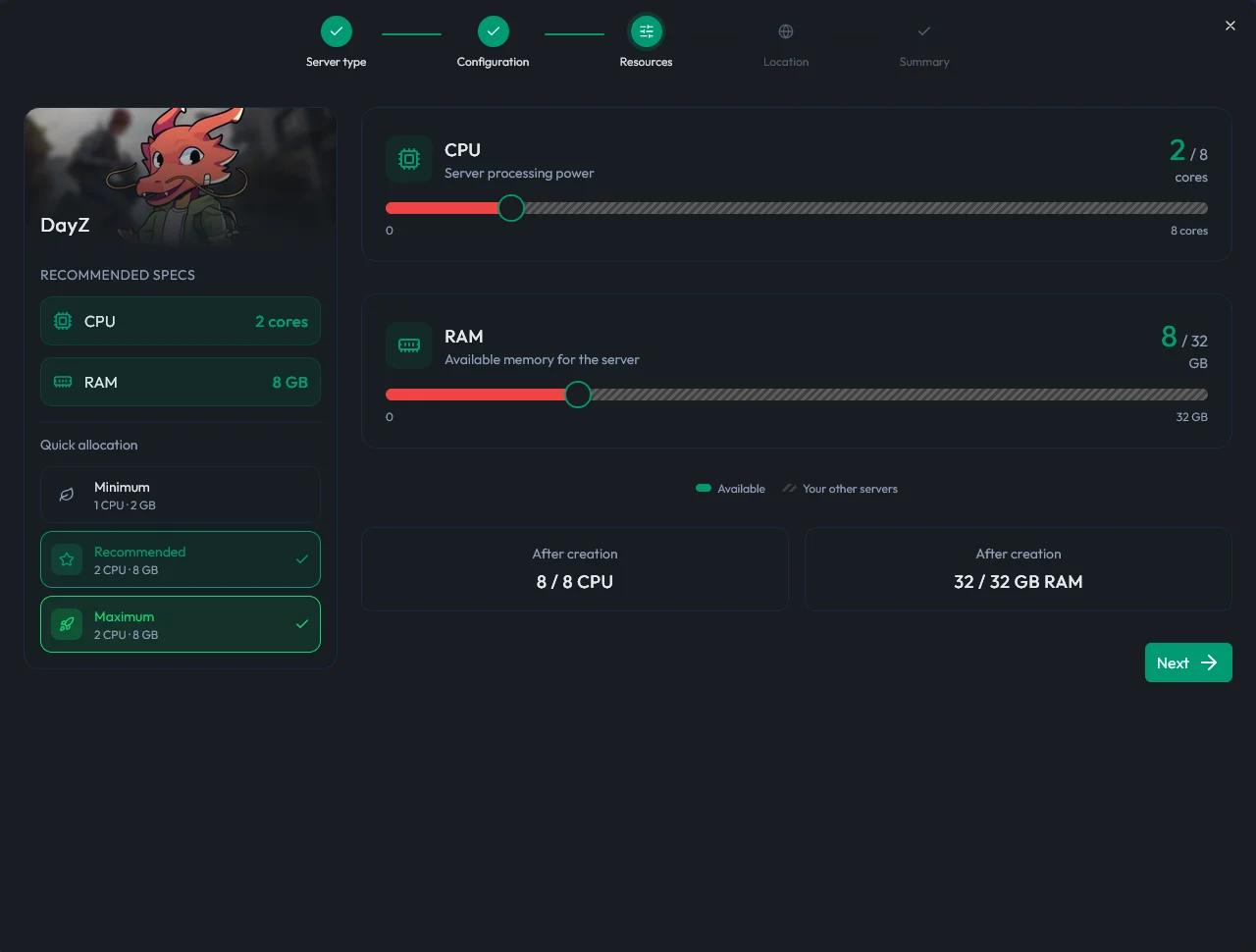
DayZ is a game of large maps and heavy persistence: sizing follows player count and mod list above all. On the DayZ hosting page, four plans are recommended: the MyBox 8 (around 20 players, from €13.99 per month), the MyBox 16 as the recommended pick (around 40 players), the MyBox 24 (around 60 players) and the MyBox 32 (around 80 players). Player counts are indicative, not hard limits.
Plan | RAM | Indicative players | Price per month |
|---|---|---|---|
MyBox 8 | 8 GB | around 20 | €13.99 |
MyBox 16 (recommended) | 16 GB | around 40 | €27.99 |
MyBox 24 | 24 GB | around 60 | €41.99 |
MyBox 32 | 32 GB | around 80 | €55.99 |
One trap worth avoiding: sizing on slot count alone. A 40-slot server that sits at 12 players most of the week costs you more than it returns, while a 20-slot server that fills every evening builds a real community. Start one tier below your ambition, watch how your population actually behaves over two or three weeks, then scale up. Moving to a larger plan takes minutes and keeps your world intact, so there is nothing to gain from over-provisioning on day one.
On memory, keep the official order of magnitude in mind: 8 GB is enough for a well-populated vanilla server, and you should aim for 24 to 32 GB to run 60 to 80 players with a heavy mod list. For a sizing grid by use case, read our guide on how much RAM a DayZ server needs. Every server also includes MyShield DDoS protection and automatic SmartBackup™ backups.
Setting up your server in minutes
Getting started requires no command line at all:
Pick your plan on the DayZ page and confirm your order, or start a free trial to test things first.
In the MineBoard panel, select DayZ: the server installs in a single click.
Choose your map (Chernarus, Livonia, Sakhal, or a community map installed as a mod).
Set the server name, slot count, difficulty and restart schedule.
Start it from the panel console and join through the DayZ launcher.
⚠️ Warning: console DayZ servers (PlayStation, Xbox) must go through the official partner mandated by Bohemia Interactive. The hosting described here covers PC servers on Steam, where mods and full configuration freedom live.
Configuring your server: mods, loot and wipes
Three areas give a DayZ server its personality. Mods come first: they install in one click from the Steam Workshop with automatic updates, and an import tool loads a complete modlist in one go. That subject deserves its own guide: installing mods on your DayZ server covers the Workshop, modlist import, dependency order and types.xml.
The loot economy comes next: how rare each item is lives in the types.xml file. You edit it directly through the panel's file manager, or over SFTP with your usual client. This is the main lever for making your server harsher or more forgiving than the official ones, and it is where most server identities are actually built.
Wipes close the list: resetting the world periodically is part of running a DayZ server, both to renew interest and to clear abandoned bases. The panel's one-click wipe tool makes the operation trivial, just don't forget to announce it to your community in advance. For pushing configuration files or pulling your logs, transfers go through the Files tab or SFTP, as covered in our guide to managing your server with WinSCP and FileZilla.
Scheduled restarts deserve a decision of their own. Most community servers restart every few hours, which clears memory, respawns loot on the map and keeps performance predictable over a long session. Set the schedule from the panel, announce it in your server description, and pick quiet hours if your community is concentrated in one time zone. Players forgive a restart they saw coming far more easily than one that drops them mid-raid.
BattlEye anti-cheat is included and active, which is non-negotiable on DayZ, where the fight against cheaters determines whether players trust your server at all.
Take time over the identity settings too: day and night cycle length (many servers speed up the night), first or third person view, whether map markers and interface aids stay enabled. These choices define your positioning, from relaxed to fully hardcore, and they deserve to be stated plainly in your server description so the right players find you.
One last setting worth deciding early: how long a disconnected player stays in the world. DayZ keeps you in game for a short window after you log out, which is what stops players from vanishing the instant a fight turns against them. Leaving it at the default is the safe choice, and changing it is the kind of decision that should be announced rather than discovered.
Getting players on your server
A DayZ server fills up through its community. Put real care into the name and the description shown in the launcher (map, loot rate, PvP or PvE rules, language), open a Discord before launch day, and introduce your server to the communities that match your region and language. There is genuine demand for well-run servers: players are looking for stability, no cheaters, and an admin team that actually shows up.
Be explicit about what your server is, and just as explicit about what it is not. A description that states the loot multiplier, the base building rules, the raid windows and the language spoken by the admins will filter your audience far better than a generic tagline. The players who stay are the ones who knew what they were signing up for, and on DayZ a small regular population beats a large one that churns every week.
Frequently asked questions
How much does a DayZ server cost?
Plans suited to DayZ start at €13.99 per month with the MyBox 8, sized for roughly 20 players in vanilla. The recommended plan for a community server is the MyBox 16 (around 40 players), and large modded servers should look at the MyBox 24 or 32.
Can you host a console DayZ server (PS5, Xbox)?
Not with any standard host: Bohemia Interactive reserves console servers for its official partner. The DayZ servers you can rent freely are for the PC Steam version, which is also the only one that accepts mods.
Which map should you pick to start a DayZ server?
Chernarus remains the best starting point: it is the map every player knows, and the one best served by mods and guides. Livonia offers a tighter alternative, Sakhal a winter survival experience (Frostline expansion), and community maps such as Namalsk far more radical takes.
Should you wipe a DayZ server regularly?
It is a common and healthy practice: a periodic wipe clears abandoned bases, restarts the loot economy and gives established players something to aim for again. The right frequency depends on your community, and the panel's one-click wipe tool makes the operation immediate.
Are mods mandatory on a DayZ server?
No. A well-tuned vanilla server (loot, difficulty, day and night schedule) already offers an experience distinct from the official ones. Mods become interesting when you want to go further: new maps, traders, vehicles, progression systems. They install in one click from the Workshop with automatic updates.
Conclusion
Creating a DayZ server in 2026 comes down to four decisions: a map that sets the tone, a plan sized to your ambition (20 to 80 players), a loot economy tuned to your taste, and a wipe policy you own. The technical side takes a handful of clicks: installation, Workshop mods and backups are all industrialised.
The best way to get your hands dirty is the free 12-hour trial, no credit card required: spin up a test server, tune your first types.xml, and see for yourself before you open to the public.