




 MineStrator
How much RAM does a DayZ server need? The short answer, straight from the official recommendations: 8 GB is enough for a well-populated vanilla server, and you should aim for 24 to 32 GB to run 60 to 80 players with a heavy mod list.
Between those two extremes, everything depends on three factors: your map, your mod list and your actual player traffic. Here is how to size correctly, without paying for memory you will never use and without discovering your server's limits on a Saturday night at peak.

What actually uses RAM on a DayZ server
DayZ is a game built on persistence: the server holds far more in memory than the players currently connected.
The map and its economy: every item that can spawn (the well-known types.xml) is tracked by the server, thousands of loot entities spread across hundreds of km².
Persistence: player-built bases, tents, buried stashes, vehicles. A server that has been running for months accumulates persistent entities that weigh on memory.
The mod list: every mod loads at startup. Large ones (community maps, frameworks, traders) are the heaviest, and stacking them pushes consumption up fast.
Players and infected: the more players spread across the map, the more active zones the server simulates at once (infected, animals, loot).
This is what sets DayZ apart from most survival games. On a title where the world resets or where structures despawn quickly, memory tracks roughly the number of connected players. On DayZ it tracks the accumulated history of everything your community has built and hidden since the last wipe. Two servers running the same map with the same mod list and the same twenty players can sit several gigabytes apart simply because one of them has been alive for six months. Sizing on player count alone will eventually catch you out.
The sizing grid by use case
The recommendations on the DayZ hosting page come down to this:
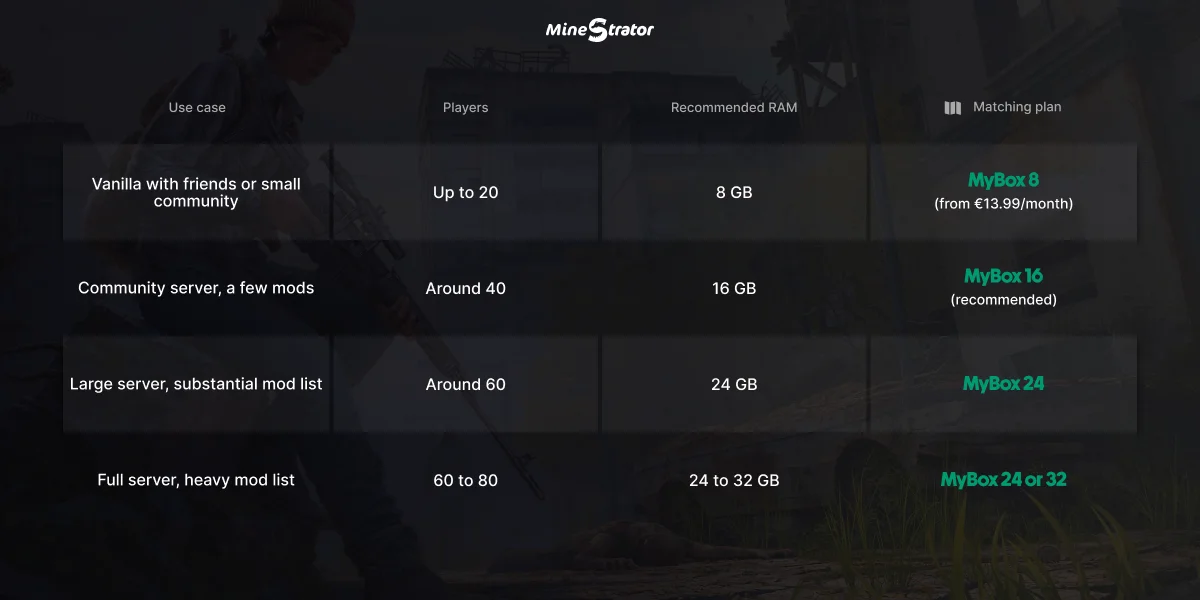
Use case | Players | Recommended RAM | Matching plan |
|---|---|---|---|
Vanilla with friends or small community | Up to 20 | 8 GB | MyBox 8 (from €13.99/month) |
Community server, a few mods | Around 40 | 16 GB | MyBox 16 (recommended) |
Large server, substantial mod list | Around 60 | 24 GB | MyBox 24 |
Full server, heavy mod list | 60 to 80 | 24 to 32 GB | MyBox 24 or 32 |
Player counts are indicative and not hard limits. If you are just starting out, take the tier below rather than the one above: upgrading happens at any time without a reinstall, and nothing replaces watching your own consumption.
💡 Tip: the SmartScan™ tool analyses the real CPU and RAM usage of your servers and tells you objectively whether your allocation is too tight, correct or oversized. Measure before you change plans.
RAM is not everything: the role of the CPU
On DayZ, the processor carries the simulation: hordes of infected, vehicle physics, animal AI and the loot economy bookkeeping. A server can have memory to spare and still stutter at peak hours if the CPU cannot keep up.
The two symptoms do not look alike. Memory saturation causes crashes, typically at startup right after adding mods. CPU saturation shows up as stutter and desync (the infamous teleporting zombies) while RAM is nowhere near full. In the second case, the answer is not more memory but a higher clock speed, which is the territory of the MyBox Perf plans running on an overclocked Ryzen 9.
This distinction matters because the instinctive reaction to any performance problem is to buy more RAM. On DayZ that instinct is wrong more often than it is right. Read the symptom first, then decide: crashes point at memory, stutter points at the processor. Our guide to sizing RAM for a Rust server covers the same reasoning on another survival title where persistence and simulation compete for resources.
When to upgrade, and when to hold
Three signals justify moving up a tier. Your server crashes at startup after a mod list change, and rolling that change back fixes it. Your memory curve sits close to its ceiling for several consecutive days rather than during a single evening. Or your player count has genuinely grown, meaning your average session is fuller than it was a month ago, not that you had one exceptional weekend.
Two situations look like they call for an upgrade and do not. The first is stutter with memory to spare, which is a processor problem and buying RAM will change nothing. The second is a server heavy with persistence that nobody uses any more: dozens of abandoned bases from players who left months ago still cost you memory every single day. A wipe, announced in advance, often reclaims more headroom than a paid upgrade would, and it costs nothing.
Common DayZ sizing mistakes
Sizing for the mod list you dream about: start with the essential mods and add in stages. Forty mods dropped in at once makes any diagnosis impossible.
Forgetting persistence: a young server uses less than a six-month-old one full of bases. Plan headroom for growth, or commit to regular wipes, which also reset consumption.
Ignoring the map: community maps each have their own consumption profile. After switching maps, watch memory for a few days before drawing conclusions. Keep an eye on the game's roadmap too: Bohemia has announced Nasdara for 2026, a desert map presented as the largest ever built for DayZ, with the server impact that implies.
Sizing on the peak instead of the pattern: one exceptional evening at full capacity does not justify a permanent tier upgrade. Look at how often you actually reach that ceiling before paying for it every month.
And if your community eventually migrates to another survival game, your MyBox follows: GameSwap lets you change game at no cost while keeping your resources.
One more variable is worth naming, because it surprises administrators every time: the number of mods matters far less than their weight. Twenty small quality-of-life mods can cost less memory than a single community map or one heavy trader framework. So when consumption jumps after an update, do not count your mods, look at which ones changed. Adding them in batches of two or three, with a restart and a look at the graph in between, turns a guessing game into a measurement (the full method is in our guide to installing mods on your DayZ server). Keep a short written log of what you added and when, because in six months your memory of that sequence will be far less reliable than your graphs.
Monitoring your server's actual usage
Sizing a DayZ server is not a one-time decision: persistence grows, the mod list evolves, traffic shifts. Your panel continuously displays memory and processor usage, with a 365-day statistics history so you can read long-term trends rather than react to a single spike.
Build three simple habits: check consumption after every mod list change, look at the memory curve after a month of accumulated persistence, and compare your peak-hour spikes against your allocation. A monitored DayZ server sees its limits coming weeks ahead. An unmonitored one discovers them mid-session, usually at the worst possible moment.
If you are still setting things up, our step-by-step guide to creating a DayZ server covers map choice, mods and wipe policy, the three decisions that shape everything you will read on those graphs afterwards.
One habit beats all the others: look at your graphs when everything is fine, not only when something breaks. Knowing what a healthy Tuesday evening looks like on your server is what lets you recognise an abnormal one at a glance, months later.
Frequently asked questions
How much RAM for a vanilla DayZ server?
8 GB covers a well-populated vanilla server of up to roughly twenty players. That is the MyBox 8 format, at €13.99 per month. Below that, you risk crashes at startup as soon as persistence starts building up.
How much RAM for a modded DayZ server?
It depends entirely on the mod list: budget 16 GB for a community server with a few mods (around 40 players), and 24 to 32 GB for 60 to 80 players with a heavy list. Community maps and large frameworks are the hungriest items.
My DayZ server lags but RAM is not full, why?
That is the signature of CPU saturation, not memory. DayZ simulation (infected, vehicles, economy) leans heavily on the processor: if the stutter appears at peak hours, the answer is a higher CPU clock speed, as on the MyBox Perf plans, not more RAM.
Does persistence consume memory?
Yes. Bases, tents, buried stashes and vehicles are persistent entities the server keeps in memory even when their owners are offline. An old server therefore consumes more than a freshly wiped one at equal player counts.
Can I change plans after launching my DayZ server?
Yes. Upgrading happens without a reinstall and without data loss: your server, its map, its mod list and its persistence all follow. That is exactly why you should start on a plan sized to reality rather than an oversized one.
Conclusion
Keep the official range in mind: 8 GB for well-populated vanilla, 16 GB for a reasonable modded community server, 24 to 32 GB for a large server with a heavy mod list. And watch the CPU as closely as the memory: on DayZ, peak-hour smoothness is decided by the simulation.
To size on real data rather than estimates, launch your configuration with the free 12-hour trial, no credit card required, load your mod list and watch consumption before committing to a plan.