

 MineStrator
Vanilla is the front door of DayZ, but modded is its heart: traders, new maps, vehicles, advanced base building systems. Almost every community server that lasts runs on a mod list. And that is where the real daily work of a DayZ administrator happens: installing, updating, ordering and balancing mods.
This guide covers the whole chain: one-click installation from the Steam Workshop, importing a complete mod list, tuning the loot economy through types.xml, and the habits that stop you from waking up to a broken server. If your server is not online yet, start with our guide to creating a DayZ server, then come back here.
How do mods work on a DayZ server?
DayZ mods live on the Steam Workshop and work as a mirror: the server loads its mod list, and every player needs the same mods client-side to connect. The DayZ launcher handles that download for the player through the Workshop, so your players have nothing to install by hand.
Two concepts shape any mod list:
Dependencies: many mods rely on a shared framework, such as CF (Community Framework), which must be present and loaded before the mods that depend on it.
Load order: frameworks and libraries go at the top of the list, content mods after. An incorrect order is the number one reason a server stops booting after an addition.
How to install a mod in one click from the panel
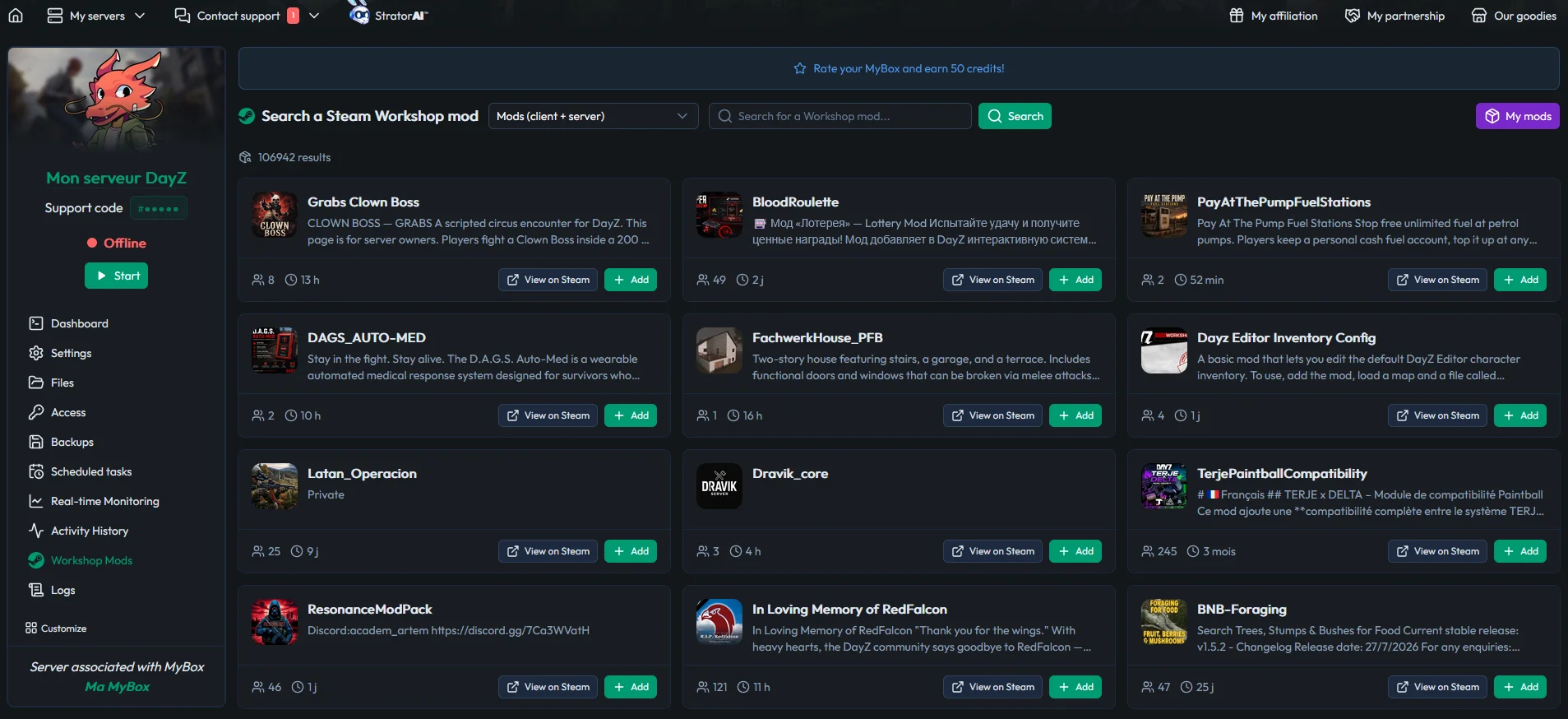
In the MineBoard panel, installing a DayZ mod happens straight from the Steam Workshop: search for the mod, click, it installs on the server. No SteamCMD to wrestle with, no files to copy.
More importantly, mods installed this way get automatic updates. That matters more than it sounds: DayZ mods update frequently, and a version mismatch between server and clients blocks connections outright. Automatic updating removes the classic ritual of waking up to a dead server because a mod shipped a new version overnight.
Importing a complete mod list
To build a server from an existing list, whether it is your own or one from a project you admire, export your mod list from the DayZ Launcher. Drop the modlist.html file at the root of your server, enter its name in the Parameters tab of the panel, and on the next start every mod in the list installs automatically.
This is the right moment to apply the golden rule: frameworks first, content second. Check the Workshop page of every large mod, the dependencies section is always listed there. If something goes wrong on first boot, the server logs point at the offending mod.
💡 Tip: document your mod list in a versioned text file (mod, version, role, dependencies). The day a mod breaks, you will know immediately what to disable, and your players will know what to expect.
How to tune the loot economy with types.xml
Every item that spawns on the map is driven by the types.xml file: target quantity (nominal), guaranteed minimum (min), how long it survives (lifetime) and how fast it comes back (restock). It is the rarity dashboard of your server.
Attribute | What it controls | Typical effect when you raise it |
|---|---|---|
nominal | Target number of copies the economy aims to keep in the world | The item becomes more common overall |
min | Guaranteed minimum before the economy forces a respawn | The item is never fully absent from the map |
lifetime | How long an untouched item survives before it despawns | Loot lingers longer in unvisited areas |
restock | Delay before the economy puts the item back into circulation | A longer delay makes the item feel scarce after a rush |
Those four values are what separate a server where military loot is everywhere from one where a single rifle is an event. They are also why copying another server's economy wholesale rarely works: their numbers were tuned for their map, their population and their wipe cycle, not yours.
The key point in a modded context: mods that add items need their own economy entries. Serious mods ship their own types files to integrate. Without them, the new items simply never appear in the world. These files are edited directly from the MineStrator panel file manager, and for a large economy overhaul you are better off working locally then sending the files back through the Files tab. You can also use a dedicated app, our article on managing your server with WinSCP and FileZilla covers SFTP transfers.
Work in small increments here too. Changing nominal values on thirty item classes at once and then judging the result three days later tells you nothing about which change did what. Adjust one category, let the economy refill, then look at what your players actually find. Loot balance is the single setting your regulars will notice fastest, and the one they will comment on the most.
🚨 Important: back up before any economy overhaul. SmartBackup™ automatically keeps a rolling window of backups, and a manual snapshot taken right before a large change lets you roll back in one click if the loot goes sideways.
Community maps: Namalsk and the others
Community maps install like mods, with their own dependencies. Namalsk, the most emblematic of them, turns DayZ into hardcore winter survival and imposes its dedicated mods on every player. Expect a real memory impact too: a rich community map weighs considerably more than a simple content mod.
After a map change, a wipe is generally necessary (persistence from the old map makes no sense on the new one), and the loot economy rebuilds on the map's own types files. The game's roadmap can reshuffle things as well: Bohemia has announced Nasdara for 2026, a desert map presented as the largest ever built for DayZ.
The habits behind a mod list that lasts
Add in small batches: two or three mods, a test, then the next batch. A mod list dropped in all at once makes diagnosis impossible.
Test after every game update: a major DayZ version regularly breaks part of the mod ecosystem. Follow the Discord servers of the large mods on your list, fixes are announced there first.
Prune dead mods: an abandoned mod will break eventually. Replacing it proactively beats dealing with the outage, and your players will forgive a planned swap far more readily than a week of downtime.
Keep a rollback path: before any batch, know exactly which mods you added and in what order. A five-minute revert is only possible if you wrote it down.
Finally, keep the whole resource picture in view: a large mod list is paid for in RAM and CPU, and our guide to sizing RAM for a DayZ server gives the tiers by server type. Our comparison of self-hosting versus renting a server explains why an ambitious modded server rarely holds up on a personal machine.
And keep your players informed. A short changelog posted on your Discord after each batch, listing what was added and what changed in the economy, costs you five minutes and spares you a week of questions. It also gives you a written history of your own server, which is exactly what you will want the day something breaks and nobody remembers when it started.
Frequently asked questions
Do players have to install mods manually to join my DayZ server?
No. Mods live on the Steam Workshop and the DayZ launcher automatically downloads the server's mods when a player connects. Your players simply let the launcher handle it, no file handling is required client-side.
Does mod order matter on DayZ?
Yes, and it is the leading cause of a server that stops booting after an addition. Frameworks and libraries (such as CF, Community Framework) load first, the content mods that depend on them come after. The dependencies section of each Workshop page tells you the order to respect.
Do you need to wipe after adding mods?
Not for a simple content addition. A wipe becomes necessary when you change map, and is recommended after a deep loot economy overhaul. In every case, a backup taken beforehand (SmartBackup™ or a manual snapshot) lets you roll back.
Why do my modded items not appear on the map?
Because the loot economy does not know about them: every item needs its entry in the types files (nominal, min, lifetime, restock). Integrate the types files shipped by the mod, or add the entries by hand in types.xml from the panel file manager, then let the economy fill in.
How many mods can a DayZ server handle?
There is no fixed limit: the constraints are RAM and load time. Large community server mod lists routinely run to several dozen mods, on 24 to 32 GB of RAM. The real limit is maintenance: every mod you add is a mod you have to follow and update.
Conclusion
The mod list is the soul of a DayZ server, and managing it is a craft: dependencies at the top, additions in small batches, a coherent loot economy and backups before every large manoeuvre. The tooling handles the rest: one-click Workshop installs, automatic updates and mod list import from the DayZ Launcher.
To build your first mod list without risk, spin up a test server with the free 12-hour trial, no credit card required: import, reorder, break things and start again, there is no better way to learn.