




 MineStrator
Your Rust server feels dead… until wipe day hits. The wipe is the heartbeat of Rust: it resets the world, deletes bases and loot, and sometimes wipes learned blueprints too. Done right, it’s the best “fresh start” event you can offer, and it brings players back in waves. Done wrong, it can empty your server faster than a geared trio at Outpost.
In this 2026 guide, you’ll learn what a wipe really is, the difference between a map wipe and a blueprint wipe, how the monthly force wipe works, and how to wipe your Rust server cleanly from the MineStrator panel. We’ll also cover the communication side, because timing and clarity are what turn a wipe into a full-pop server night.
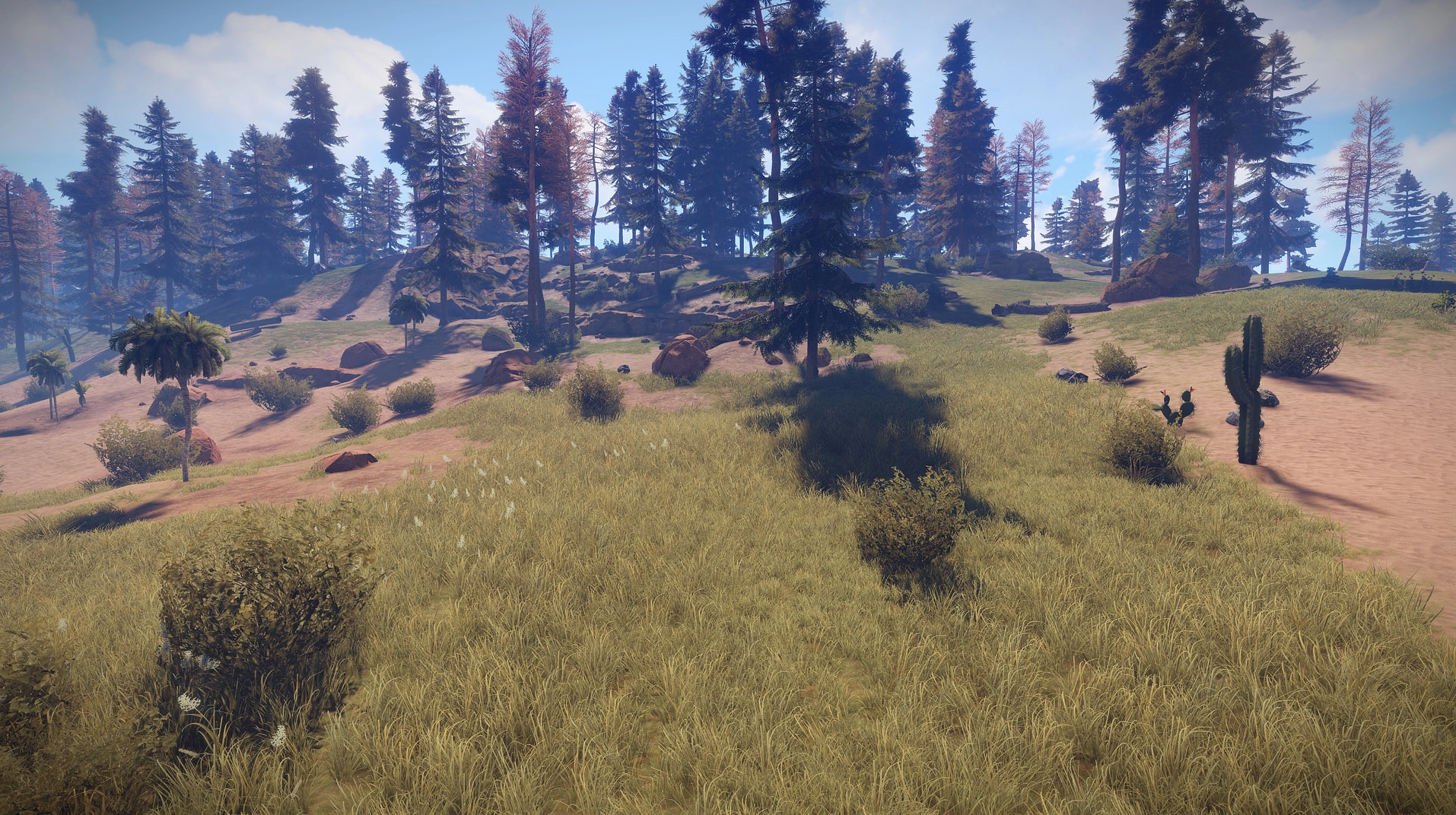
Source: Rust Devblog
What does a Rust wipe reset?
A Rust wipe is a deliberate reset of your server’s progression data. It removes the saved world (bases, placed items, stashes, loot progression) and, depending on the wipe type, it may also delete players’ learned crafting plans (blueprints).
The goal is to restart the gameplay loop. Without regular wipes, big clans lock down the map, late joiners get farmed on sight, and your server slowly bleeds players. A wipe is both a balance tool and a community “rally point” players plan their return around.
📝 Note: In Rust, wipe culture is real. Many players pick servers mainly based on wipe schedule and wipe type.
Map wipe vs blueprint wipe: what’s the difference?
The difference is simple: a map wipe resets the world only, while a blueprint wipe also resets crafting progression. Choosing the right one depends on how “fresh” you want the restart to feel, and how much long-term progression you want players to keep.
Map wipe: new map, bases and loot are gone, but players keep their blueprints
Blueprint wipe (full wipe): map wipe + learned blueprints are deleted
💬 Good to know: A popular rhythm is weekly map wipes plus a monthly blueprint wipe. It keeps the map fresh while still giving players a “progression month”.
Monthly force wipe: the one nobody escapes
The force wipe is mandatory for all Rust servers and happens on the first Thursday of every month. That’s when Facepunch ships the big monthly update, and it often changes data formats in a way that makes old saves incompatible.
Result: every server must wipe. This is usually the biggest population spike of the month, so it’s the perfect moment to run a full blueprint wipe and go hard on announcements to pull players back in.
Want the official context? Keep an eye on the Rust news page by Facepunch for monthly update posts and timing.
Pick the right wipe schedule
There’s no single “best” wipe schedule. The only non-negotiable is the monthly force wipe, but most servers add extra wipes to keep the pace fun and the map competitive.
Mainstream PvP: weekly map wipe, monthly blueprint wipe
Vanilla or hardcore: bi-weekly or monthly to reward long progression
Modded or RP: longer cycles where community beats reset hype
Whatever you choose, publish a clear calendar and keep it stable. Rust players plan their week around wipe times, and “surprise wipes” are a great way to lose trust. Also expect a connection spike right after wipe, so make sure your server is sized for peak load to avoid a wipe-day slideshow. Our guide on how much RAM a Rust server needs gives concrete numbers by player count and wipe frequency.
How do you wipe a Rust server on MineStrator?
On MineStrator, wiping is mainly about deleting the correct save files from your MineBoard. If you’re starting from zero, follow our guide to create a Rust server in 2026 on MineStrator before you plan your first wipe.
Follow these steps for a clean wipe:
Stop the server before touching any save file.
Open the Files tab, then go to
server→rust.For a map wipe, delete the
.mapand.savfiles.For a blueprint wipe, also delete the
.dbfiles.Restart the server to generate a fresh world.
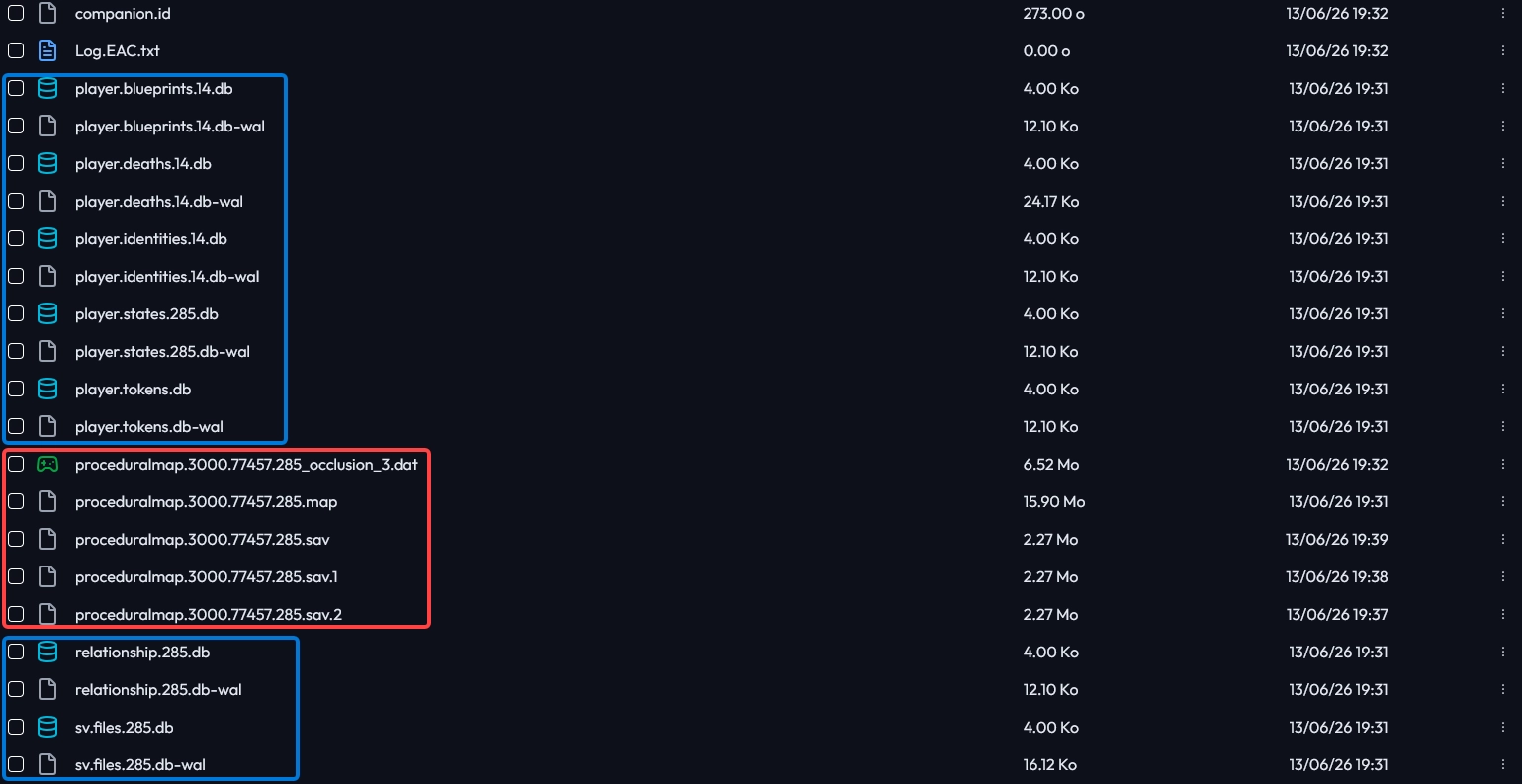
🚨 Important: Create a Snapshot before deleting anything, and only remove the files you intend to wipe. Deleting a
.dbby mistake triggers an unwanted blueprint wipe, and your community will definitely notice.
How do you change seed and map size after a wipe?
The seed controls the map layout, and the world size (worldsize) controls how big the map is. Both are configured in your server startup settings from the MineBoard Settings tab.
Update World seed to generate a new layout, and adjust World size to match your player count. The default is 4000, and typical values range from 1000 to 6000. After a wipe, remember that some plugins store their own data; if you use them, you may need to reset plugin data too. If you’re not set up yet, read our guide to install Oxide plugins on Rust (2026).
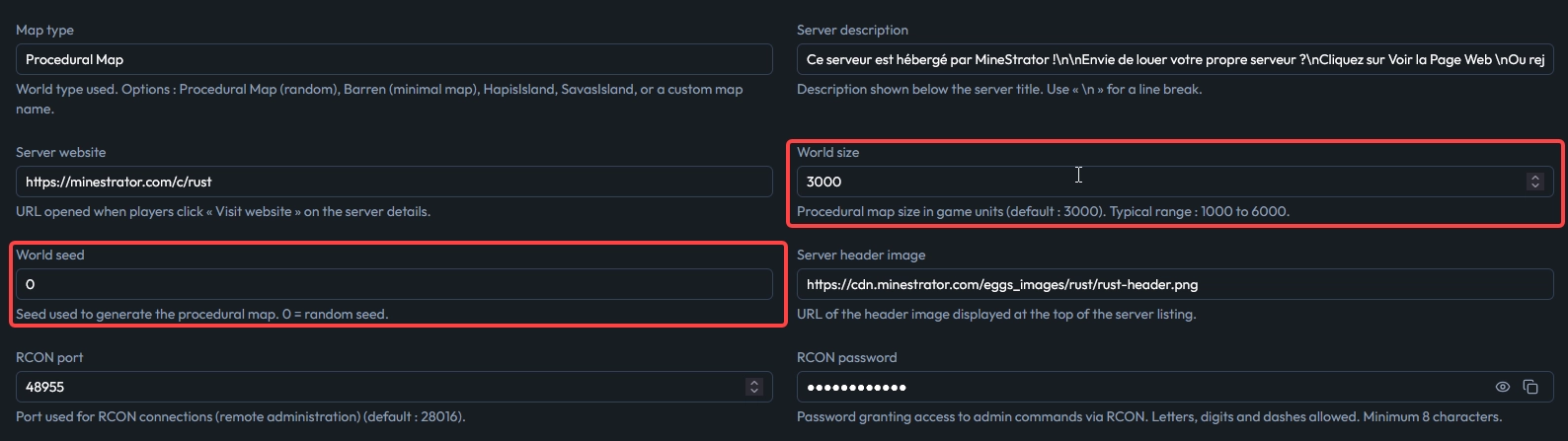
💡 Tip: Change the seed on every map wipe to keep exploration fresh, but keep the world size consistent with your population. A huge map with low pop feels empty, even if your server is “active”.
Announce the wipe and bring players back
A successful wipe is half technical, half communication. Players need to know exactly when to show up and what kind of reset they’re getting, otherwise they’ll simply jump to another server that’s clearer.
Announce the exact date and time early on Discord and in-game
State the wipe type: map wipe or full blueprint wipe
Highlight what changes with the monthly update to build hype
Optimize your server listing before peak time with this guide to improving your Rust server description
💡 Tip: Put your wipe schedule directly in your server banner or description. It sets expectations and prevents “I just joined and you wipe tomorrow?” rage quits.
Frequently asked questions
What is a wipe on a Rust server?
A Rust server wipe is a reset of progression data that deletes the saved world (bases, loot, placed items) and, depending on the wipe type, learned blueprints too. The goal is to restart the gameplay loop so new players can compete and the map doesn’t stay locked by large groups. On MineStrator, you trigger a wipe by deleting the relevant save files from the MineBoard panel.
What is the difference between a map wipe and a blueprint wipe?
A map wipe resets the world only, while a blueprint wipe (full wipe) resets the world plus learned blueprints. A map wipe removes bases and loot but keeps crafting progression; a blueprint wipe puts everyone back to zero. On MineStrator, a map wipe means deleting the .map and .sav files, while a blueprint wipe also deletes the .db files.
When is Rust’s monthly force wipe in 2026?
Rust’s force wipe happens on the first Thursday of every month, alongside Facepunch’s monthly update. Because the update can change save formats, old saves often become incompatible, so every Rust server must wipe. MineStrator recommends announcing the wipe 24 to 72 hours ahead, because force wipe day is usually the biggest population peak of the month.
How often should you wipe a Rust server?
The minimum is the monthly force wipe, which is mandatory. Beyond that it depends on your community: many PvP servers run weekly map wipes and keep the blueprint wipe for the monthly force wipe, while modded or RP servers use longer cycles. The key on any MineStrator server is a stable, clearly announced schedule that players can plan around.
How do you wipe a Rust server on MineStrator?
To wipe a Rust server on MineStrator, stop the server, delete the correct save files, then restart to generate a fresh world. For a map wipe, delete the .map and .sav files; for a full blueprint wipe, delete .map, .sav and .db. MineStrator best practice is to create a Snapshot before deletion, because removing a .db by mistake triggers an unwanted blueprint wipe.
How do you change the Rust seed without wiping blueprints?
To change the Rust seed without wiping blueprints, update the startup settings (World seed and optionally World size) and delete only the world files. Delete .map and .sav to regenerate the map, but never delete .db files, because they contain player progression including blueprints. MineStrator recommends keeping world size consistent with population (common range 1000 to 6000) to avoid an empty-map feel.
Conclusion
Managing a Rust wipe comes down to three things: choosing the right wipe type (map or blueprints), setting a schedule that fits your community (with the monthly force wipe as the baseline), and communicating clearly so players know when to come back. On the technical side, it’s all about deleting the correct save files and adjusting seed/world size safely.
On MineStrator, Rust servers run on dedicated CPU and RAM, with a MineBoard that gives you direct access to your save files and startup settings in a few clicks, so you can wipe on your own schedule without depending on support.
Want to test your wipe process without risking your main community? Launch a server and practice your routine with the free 12h trial, no credit card required.
Once you find your wipe rhythm, stick to it: consistency is what keeps a Rust community coming back over time, far more than the occasional spectacular wipe.