



 MineStrator
Want to play ARK Survival Evolved dedicated server with your friends or community, with your own rules and mods, without relying on official servers? The most reliable option is still hosting your own dedicated server.
Released in 2015, ARK Survival Evolved is still a multiplayer survival classic in 2026. Built on Unreal Engine 4, it’s generally lighter than ARK: Survival Ascended, while keeping the same addictive loop: taming dinos, building bases, exploring, and PvP chaos. And yes, the Steam Workshop mod scene is huge.
With MineStrator and the MyBox system, you can get your server online in under 10 minutes. This guide walks you from the first click to your first players joining.
ARK Survival Evolved dedicated server benefits
An ARK Survival Evolved dedicated server gives you full control: no overcrowded official servers, no forced rules, and way fewer random toxic encounters. You decide how the game feels, who joins, and how fast progression goes.
With your own server, you can:
Choose your map (The Island, Ragnarok, Fjordur, Lost Island)
Tune rates (XP, harvest, taming, breeding)
Add Steam Workshop mods for extra content
Lock access with a password
Keep it online 24/7 even when your PC is off
💬 Good to know: Still unsure between self-hosting and renting? Read our comparison hosting at home vs renting a server.
Create your MyBox ARK server
MineStrator’s MyBox lets you create and manage game servers from your MineBoard panel. To start your ARK Survival Evolved dedicated server, follow these steps:
Log in to your MineBoard and open the MyBox section
Click Create a server to begin setup
Select ARK Survival Evolved from the game list
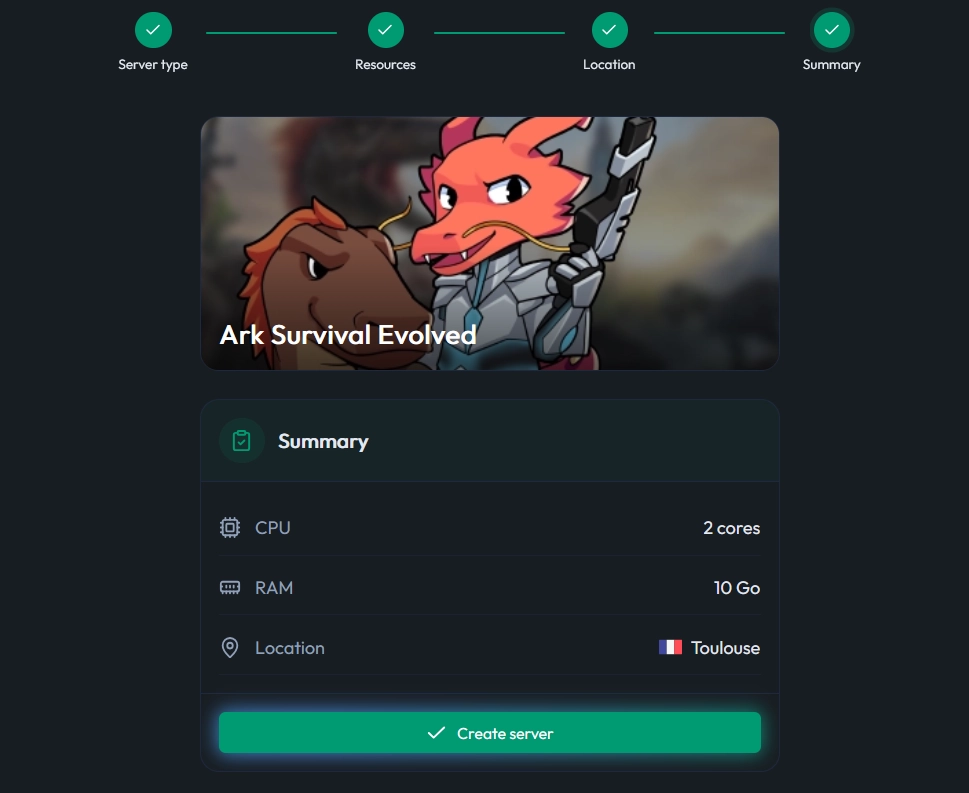
After that, the panel guides you through resource selection. Since ARK Evolved is lighter than Ascended, you don’t need a monster setup to get smooth gameplay.
Choose the right server resources
ARK Survival Evolved runs on Unreal Engine 4, which keeps server requirements reasonable, even with mods. Your real needs depend on player count, map, and how wild your mod list gets.
Here’s a practical baseline for an ARK Survival Evolved dedicated server in 2026.
Minimum resources
For a small private server with 2 to 5 players:
RAM: 8 GB minimum
CPU: 2 cores
This is fine for a vanilla experience on a standard map like The Island. Performance can drop with lots of mods or a higher player count.
Recommended resources
For 10 to 20 players with mods:
RAM: 12 GB or more
CPU: 3 cores or more
🚨 Important: Even if ARK Evolved is lighter than ASA, RAM is usually the main bottleneck. If you must choose, pick more RAM over more CPU. Popular mods like Structures Plus or Dino Storage v2 increase memory usage.
With MyBox, you can scale resources anytime. Start reasonable, then upgrade if your server grows or your modpack gets spicy.
First boot and installation time
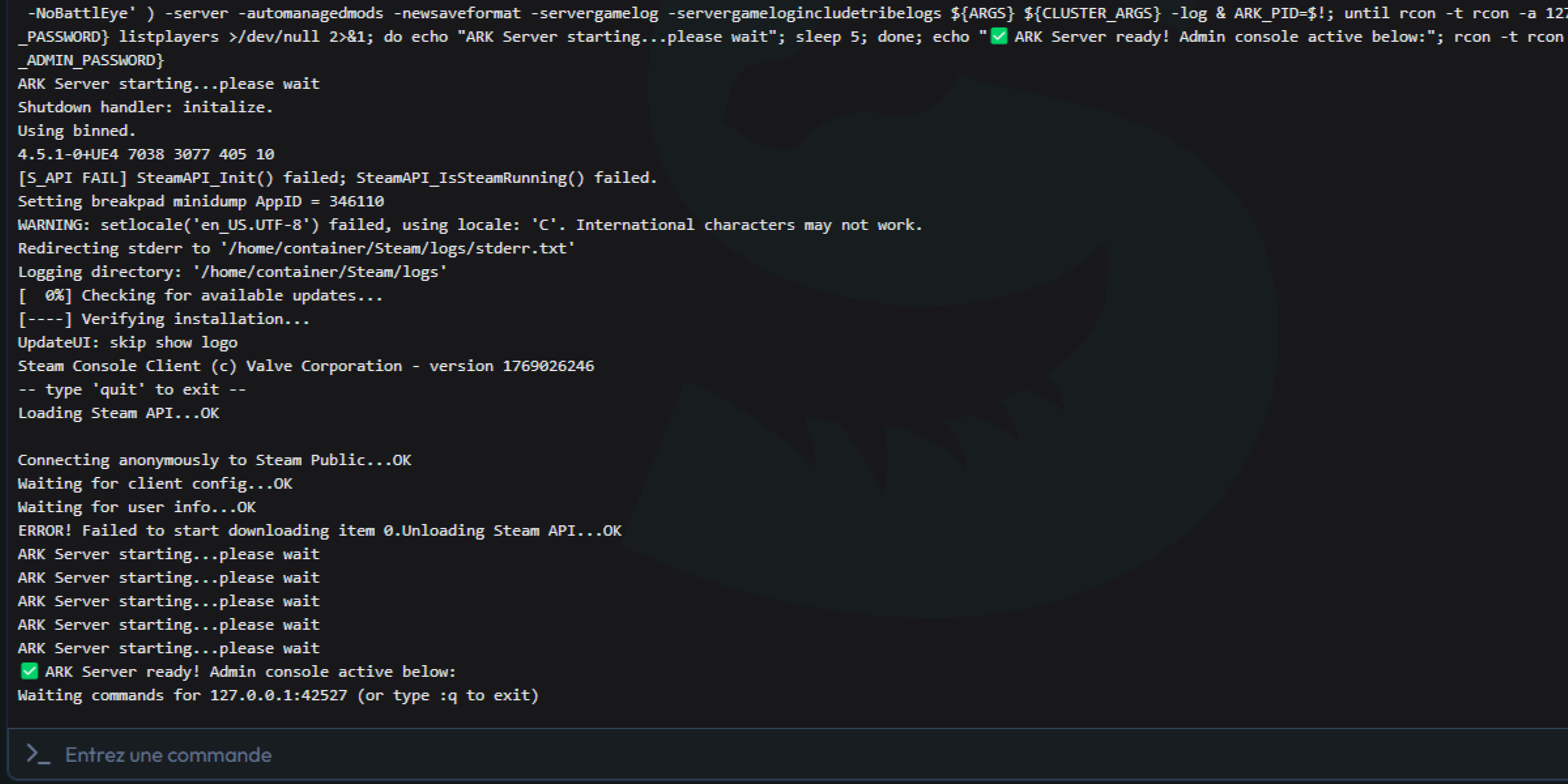
Once your server is created and resources are set, start it from MineBoard. The first boot is special because the server downloads and installs ARK files through SteamCMD.
⚠️ Warning: The first start can take several minutes. Don’t restart the server during installation, even if it looks slow.
Watch progress in the panel console. The server process (ShooterGameServer) downloads files and loads the map. When you see ARK Server ready, your ARK Survival Evolved dedicated server is live.
From there, it stays online 24/7. Close your browser, shut down your PC, go touch grass—your server keeps running on MineStrator’s infrastructure.
Find your IP and query port
To join and invite others, you’ll need your server IP and ports. You can find them on your MineBoard server homepage.
The classic format is: IP:PORT. Example: 145.239.XX.XX:27548.
📝 Note: ARK uses the main port, but Steam uses the query port to find servers. If you enter the main port in Steam, your server may not show up.
By default, the query port is usually port + 1. You can confirm it in your server settings tab.
Join your ARK server (two methods)
You can connect to your ARK Survival Evolved dedicated server either through Steam (most reliable) or directly in-game. If you’re setting up a community server, Steam favorites are your best friend.
Method 1: via Steam (recommended)
Open Steam
Go to View then Servers
Open the Favorites tab
Click Add a server and enter
IP:QUERY_PORTDouble-click the server to join
Method 2: via the game
Launch ARK Survival Evolved
Click Join ARK
Filter to Unofficial servers (check other filters too)
Search your server name
Select it and click Join
💡 Tip: Steam is usually faster and more reliable. Add your server to favorites for easy access. You can also connect via the in-game console with
open IP:PORT.
Configure your ARK server settings
Your server works out of the box, but customization is where the fun starts. ARK Survival Evolved is mainly configured through two files you can edit via the MineBoard file manager.
Most changes require a restart to apply, so plan your tweaks like a true admin: test, restart, and keep notes.
Edit GameUserSettings.ini
GameUserSettings.ini contains your main server settings under [ServerSettings]. These are the settings you’ll touch first when naming, securing, and tuning your server.
Common options include:
SessionName: server name in the list
ServerPassword: password to join (empty = public)
ServerAdminPassword: admin password for in-game commands
MaxPlayers: max simultaneous players (default 70)
DifficultyOffset: difficulty (1.0 = max wild level 150)
🚨 Important: Always set a strong, unique ServerAdminPassword. It unlocks admin commands via
enablecheats YourPassword.
Edit Game.ini for advanced gameplay
Game.ini is where you tune advanced gameplay values and progression speed. If you want “less grind, more dinos,” this file is your playground.
Useful settings include:
XPMultiplier: increase XP gains
HarvestAmountMultiplier: increase harvested resources
TamingSpeedMultiplier: speed up taming
BabyMatureSpeedMultiplier: speed up baby growth
MatingIntervalMultiplier: reduce breeding cooldown
To apply changes, save the file and restart your server from the panel. For a full list of parameters, check our guide : ARK: Survival Evolved - Server Settings.
💡 Tip: For a friends-only server, x3 to x5 on taming and harvesting feels great without turning ARK into creative mode. A
TamingSpeedMultiplier=5can turn a 2-hour tame into about 24 minutes.
Go further: mods and multi-map clusters
Once your ARK Survival Evolved dedicated server is stable, you can level it up with mods, clusters, and admin tools. This is where ARK really becomes “your” game.
Install Steam Workshop mods
ARK has one of the biggest Steam Workshop ecosystems around. Classics like Structures Plus (S+), Dino Storage v2, or Awesome Spyglass can massively improve quality of life and change the meta.
On MineBoard, you typically add mod IDs in GameUserSettings.ini, or directly in the mods field in the settings tab if available.
💡 Tip: To save time, paste your mod IDs separated by commas in the mods field in the Settings tab, then restart the server.
Create a multi-map cluster
Want multiple maps for your community? A cluster links several ARK servers and lets players travel between maps with their character, items, and creatures.
If you plan to run Ragnarok + Fjordur + a PvP arena map, clustering is the clean way to do it. Just keep in mind it requires extra resources and a bit more admin discipline.
Invite friends the right way
To invite friends, share your IP:QUERY_PORT (for the Steam method) from the connection info you found earlier. If you set ServerPassword, send it too, ideally in a private channel.
If you decide to give someone admin access, share ServerAdminPassword carefully. One “helpful” admin can also become one accidental dino-deleting disaster.
Questions frequentes
Why can’t Steam find my ARK server?
Most of the time, it’s a port issue. Steam server browser uses the query port, not the main game port. Try adding IP:QUERY_PORT (often port + 1) in Steam Favorites, then refresh.
Do mods slow down an ARK Survival Evolved dedicated server?
Yes, some do. Mods can increase RAM usage, loading time, and save size. Start with a small mod list, test stability for a few days, then expand gradually to avoid chasing crashes at 3 AM.
How many players can my server handle?
It depends on your map, mods, and rates, but RAM is usually the limit. For 2–5 players, 8 GB is a solid start. For 10–20 players with mods, aim for 12 GB+ and scale up if you notice stutters or long save spikes.
Conclusion
In 2026, setting up an ARK Survival Evolved dedicated server is still one of the best ways to enjoy ARK with friends: full control, mods, custom rates, and a server that stays online 24/7. With MineStrator’s MyBox, the whole setup is quick, clean, and scalable.
Don’t have a server yet? Try it free for 12 hours, no credit card required—perfect to validate performance, mods, and settings before going all-in.