


 MineStrator
Minecraft Bedrock is the version of Minecraft that brings every platform together in a single world: Xbox, PlayStation, Nintendo Switch, Android and iOS phones, Windows and VR headsets. Creating a Bedrock server means giving your community a shared world that stays online 24/7, one that everyone joins from their own device, with no console left running in a corner of the living room.
The good news: setting it up requires no technical skills. In 2026, everything happens from a web panel, from installing the server to adding add-ons, and all that is left is sharing your address with your players.
This guide covers the whole journey: picking the right plan, creating the server, choosing between the official Bedrock engine and PocketMine, getting your friends in, consoles included, then customizing and protecting your world.
What is a Minecraft Bedrock server?
A Minecraft Bedrock server is a permanent multiplayer world reserved for Bedrock Edition players, the edition used on consoles, mobile and the Windows app. It is the only kind of server that Xbox, PlayStation and Switch players can join natively, which makes it the go-to option for a community that plays anywhere other than PC.
Bedrock Edition runs on an engine written in C++, distinct from Minecraft Java. The two ecosystems do not mix: a Bedrock server never accepts Java clients. Since 2026, however, both editions share the same yearly 26.x version format, which makes updates easier to follow.
💬 Good to know: the other way around, a Java server can welcome Bedrock players through GeyserMC and Floodgate. We cover that setup in our Java-Bedrock crossplay guide.
On the customization side, Bedrock does not use Java mods but add-ons: behavior packs and resource packs that change how the game, creatures and textures behave. Their big advantage in multiplayer: they are sent automatically to every player who connects, on console and mobile alike, with nothing to install on the client side.
Why a dedicated server rather than a Realm?
A dedicated server gives you what a Realm cannot: an open player count, full access to the server files and the choice of engine. A Realm remains fine for a small group, but it is capped at 10 simultaneous players on Realms Plus and gives you no access to advanced settings or file-level backups.
Locally shared worlds have another limit: they only live while the host is playing. As soon as the host console or PC shuts down, the world disappears for everyone. A hosted server stays online 24/7, your community keeps progressing while you sleep, and your personal IP address is never exposed.
With a hosting provider, the server is also protected against DDoS attacks and backed up automatically, two things neither a Realm nor local sharing seriously covers.
Which plan should you pick for your Bedrock server?
The choice comes down to one question: how many players will be connected at the same time? At MineStrator, the MyBox plans recommended for Minecraft Bedrock start at €6.99/month, with dedicated RAM and CPU, and the player count is not artificially limited: the tiers below are indicative.
Plan | RAM | Players (indicative) | Price |
|---|---|---|---|
MyBox 4 | 4 GB | Up to 5 | €6.99/month |
MyBox 8 ✅ recommended | 8 GB | Up to 10 | €13.99/month |
MyBox 12 | 12 GB | Up to 20 | €20.99/month |
MyBox 16 | 16 GB | Up to 40 | €27.99/month |
These monthly prices drop by up to -50% depending on the commitment chosen at checkout. And if your project starts small, you can begin with a free Minecraft server for life, the MyBox Free, which supports Bedrock as well as Java. Our free server walkthrough details the setup in five minutes.
💡 Tip: the official Bedrock server, written in C++, uses less RAM than a Java server for the same player count. If you are hesitating between two sizes for a pure vanilla server, the smaller one is often enough to start, and you can scale up later. For larger servers, a Performance MyBox may be needed to keep up with the load of many players without lags.
Creating your Bedrock server step by step
1. Order your MyBox
Pick your plan and confirm the order: delivery is instant, your server is ready in seconds. You receive your panel access, and everything else happens from there.
2. Install Minecraft Bedrock
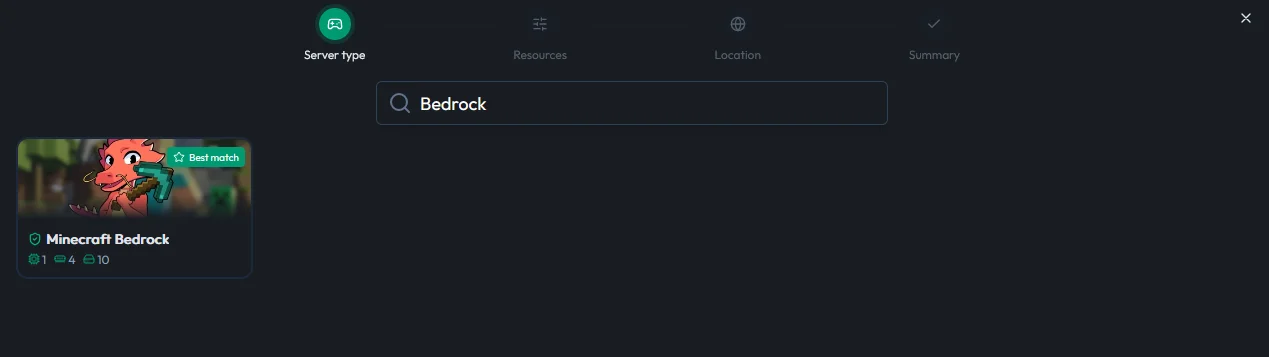
In the panel, select Minecraft Bedrock from the game catalog, then launch the installation. The server starts with a working default configuration, so you can join your world right away.
3. Adjust the essential settings
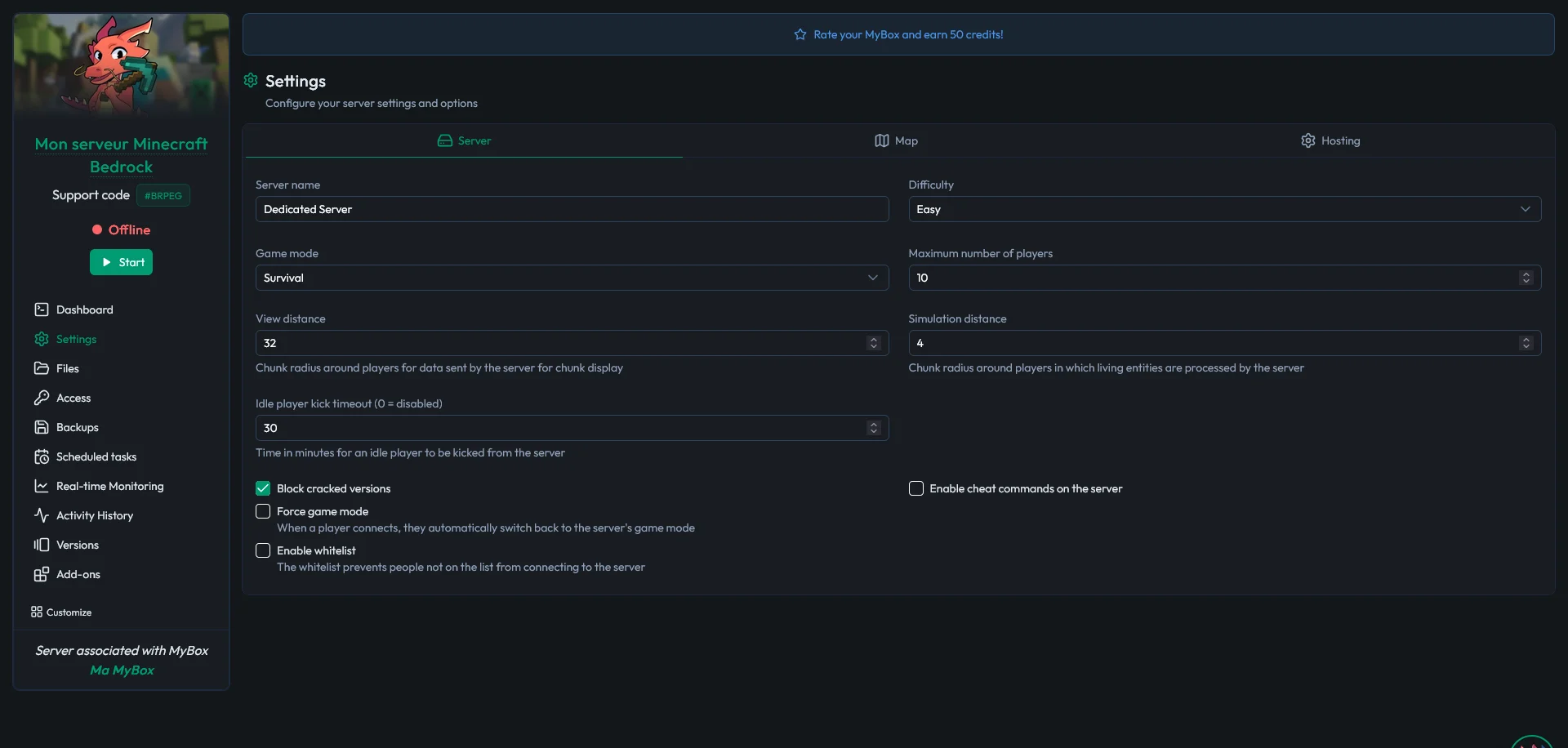
Then take two minutes to set the basics: server name, game mode (survival or creative), difficulty, and maximum player count. Bedrock uses port 19132 over UDP by default. On a MyBox, your server's port is assigned automatically and shown in the panel: that is the one your players will enter, along with your address.
Official Bedrock or PocketMine: which engine should you choose?
The official Bedrock server is the best default choice: it is Mojang's engine, stable, always up to date and perfectly faithful to the game, ideal for playing with friends and add-ons. PocketMine is for projects that want to go further, with a plugin system that enables minigames, economy, land protection and custom commands.
Criteria | Official Bedrock | PocketMine |
|---|---|---|
Origin | Mojang | Community |
Game fidelity | ✅ Full | ⚠️ Partial (reimplementation) |
Add-ons | ✅ Yes | ❌ No |
Plugins | ❌ No | ✅ Yes |
Typical use | Survival with friends, add-ons | Minigames, large community projects |
Good news, this choice is not final: on your MyBox, you switch from one engine to the other in one click from the panel, whenever you want.
If you want to keep your progression however, be careful, as an official world is not compatible with PocketMine (and the same is true the other way around).
How do your friends join your server?
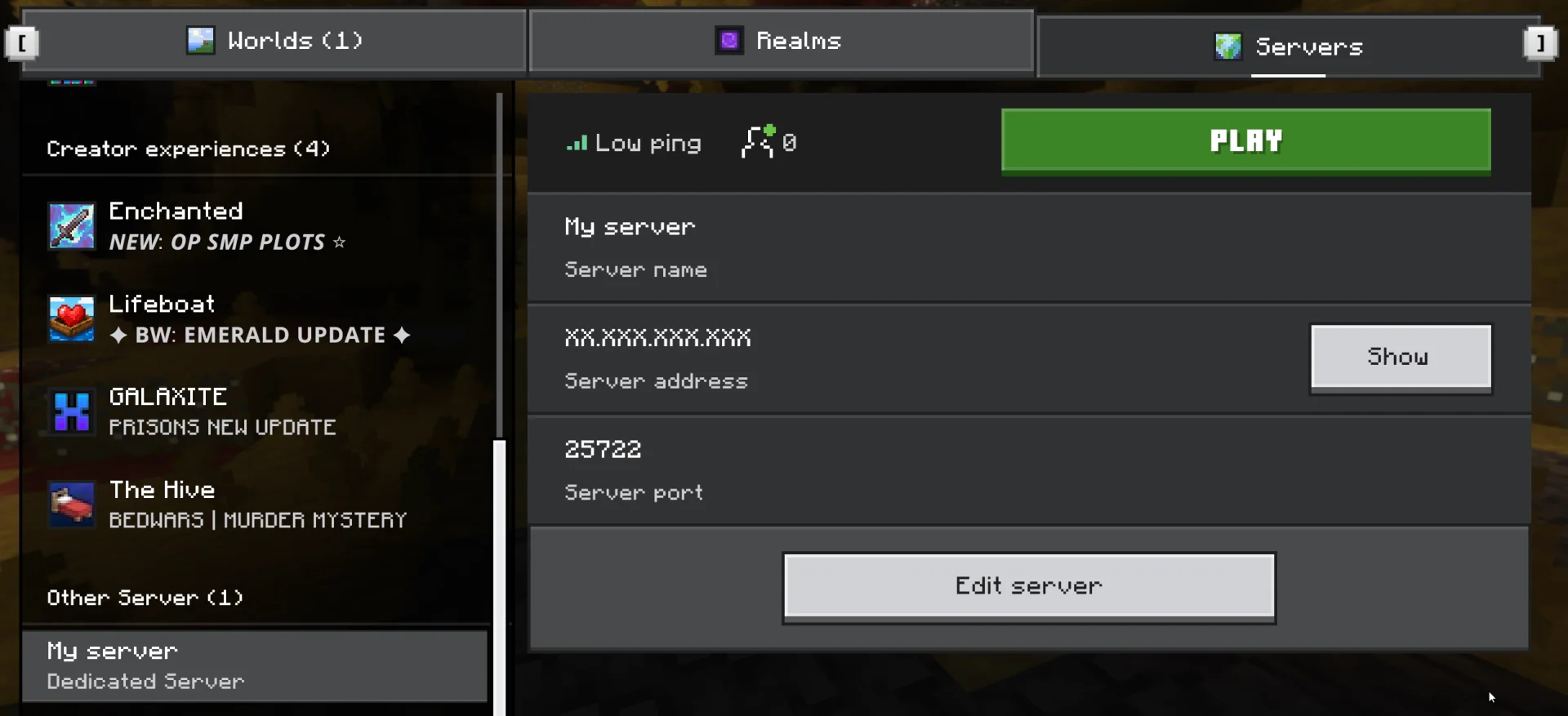
On Windows and mobile, it is immediate: in the game's Servers tab, your players simply add the server address and its port. Every MyBox ships with a free subdomain, much easier to remember and share than a raw IP address.
On consoles, Mojang does not allow adding a custom server address directly. The standard workaround is a DNS redirect: you change the network settings of the Xbox, PlayStation or Switch to point to a DNS that makes your server appear in the game. The setup takes a few minutes and MineStrator support guides you through it step by step, 7 days a week.
🚨 Important: your players must run the same game version as the server. If connections fail right after a Minecraft update, first check that the server has been updated from the panel.
Customizing your world with add-ons, maps and packs
This is where Bedrock shines in multiplayer. You import your add-ons, behavior packs and resource packs from the panel, enable them on the world, and they are distributed automatically to every player who connects. Nobody has to download or install anything, even on console or mobile.
To go further, two dedicated guides cover these steps: adding an add-on to your Bedrock server and installing a custom map, from adventure maps to minigame worlds.
Do not overlook admin commands either: gamerules, teleportation, player management. Our complete Minecraft commands guide covers both editions, Java and Bedrock.
Running and protecting your server day to day
Three habits keep a server healthy. First, control who gets in: the allowlist restricts access to players you have approved, essential once your address travels beyond your circle of friends. Second, hand out operator permissions sparingly: admin rights unlock every command.
Finally, backups. On a MyBox, SmartBackup™ automatically backs up your world over a rolling month, restorable in a single click: a TNT party gone wrong or a corrupting add-on only costs you a few minutes. DDoS protection is included and always on, with MyShield mitigation up to 24 Tb/s, with nothing to configure on your side.
Frequently asked questions
Can I create a free Minecraft Bedrock server?
Yes. MineStrator offers the MyBox Free, a free-for-life server that supports both Minecraft Bedrock and Java. You can also test a full plan with the free 12-hour trial, no credit card required. For a server built to last with several regular players, the MyBox 4 at €6.99/month remains the recommended entry point.
How do I join a Bedrock server from an Xbox, PlayStation or Switch?
Mojang does not allow you to add a custom server address directly on consoles. The workaround is a DNS redirect: you change the DNS settings in your console's network options, which then makes your server appear in the game. At MineStrator, support walks you through the setup step by step, 7 days a week.
What is the difference between a Bedrock server and a Java server?
They are two separate ecosystems. A Bedrock server hosts console, mobile, Windows and VR players, and is customized with add-ons; it never accepts Java clients. A Java server hosts PC players with mods and plugins, and can open up to Bedrock players through GeyserMC. If your community plays mostly on console or mobile, Bedrock is the right choice.
How many players can a Minecraft Bedrock server host?
It mostly depends on RAM. Expect around 5 players on 4 GB, about ten on 8 GB, around twenty on 12 GB and up to 40 on 16 GB. Unlike a Realm, capped at 10 simultaneous players on Realms Plus, a dedicated server imposes no fixed limit: these figures are indicative and you scale resources to match your community.
Can I install plugins on a Bedrock server?
Yes, through PocketMine, the alternative engine available in one click from the MineStrator panel. Mojang's official Bedrock server, on the other hand, is customized with add-ons, behavior packs and resource packs, sent automatically to every player who connects, including on console and mobile. However, keep in mind that these are PocketMine plugins: Bukkit-based plugins (Spigot, Paper) will not work.
Conclusion
Creating a Minecraft Bedrock server in 2026 boils down to four steps: pick a plan that matches your player count, install the game from the panel, adjust your settings and share your address, with the DNS redirect for consoles. The result: a shared world online 24/7, where your whole community meets, whatever their platform.
At MineStrator, you can validate the entire journey with the free 12-hour trial, no credit card required: create your Bedrock server, invite two or three friends and judge for yourself.
And if your community grows, everything follows: you change plans without reinstalling, your add-ons and your world stay in place, and support remains available 7 days a week for the rest of the adventure.