In 2026, NeoForge has become the most sensible choice for a modern modded Minecraft server, especially when you’re running big modpacks. The problem is that most “quick guides” stop at the Install button… and then you’re on your own when the first crash hits.
In this guide, you’ll do it the clean way: why NeoForge took the lead, how to pick the right version, what MineStrator plan makes sense for stability, and how to install modpacks, NeoForge, and individual mods directly from the panel.
If you also want to improve performance once your server is online, check our Spark guide to diagnose Minecraft server lag in 2026.
NeoForge in 2026: why it wins
NeoForge is a Forge fork launched in 2023, but it’s not “Forge with a new logo”. The project is driven by a very active team, with a more community-oriented governance and a clear goal: keep up with Mojang releases instead of lagging behind.
That’s why many heavy modpacks moved over quickly. NeoForge targets what server admins actually care about: stability, faster updates, and an API designed for complex packs (machines, energy systems, dimensions, and dozens of mods interacting at once).
📝 Note: NeoForge officially targets compatibility starting from Minecraft 1.20.1. For older versions (1.16.5, 1.12.2), Forge is still the most viable option.
Pick the right modloader for your server
Comparing modloaders only by “performance” or “number of mods” is often misleading. The real deciding factor is your goal: a lightweight vanilla-plus server, or a massive modpack with progression, automation, and content everywhere.
Fabric: lightweight, fast updates, great for optimization and near-vanilla gameplay
NeoForge: best for big modpacks and heavy mechanics, with a solid base for complex stacks
Forge: mainly useful in 2026 for legacy servers and unported mods
⚠️ Warning: NeoForge and Fabric are not interchangeable. A Fabric mod won’t run on NeoForge (and vice versa). Always verify each mod’s compatibility on CurseForge or Modrinth before installing.
Choose a MineStrator plan for NeoForge
NeoForge itself isn’t the RAM monster. What really eats resources is the number of mods, chunk generation, entities, automation blocks, and of course how many players are online. A “small pack” and a 300+ mod pack are basically different games.
Most of the time, a MyBox 8 is a great balance when you’re starting a modpack server. For mega-packs, go bigger so you keep headroom during peaks and avoid ticks exploding when everyone explores at the same time.
Light pack (< 50 mods): 4–6 GB RAM
Medium pack (50–200 mods): 6–8 GB RAM
Heavy pack (200–400 mods): 8–10 GB RAM
Mega-pack (ATM10, 400+ mods): 10–12 GB RAM
💡 Tip: Add FerriteCore on the server side. On big packs, it often reduces RAM usage by 30–40% without changing gameplay.
Not sure how much power your modpack needs? Use MineStrator’s interactive purchase guide to estimate resources quickly.
Install a NeoForge modpack from the panel
In 2026, the easiest approach is installing your modpack directly from the MineStrator panel. You avoid manually uploading hundreds of files, and you start from a clean, guided base (folders, configs, libraries) that’s ready to boot.
⚠️ Warning: Installing a modpack triggers a reinstall and deletes existing files. Back up your world in the Backups tab before continuing.
Follow these steps in your panel:
Open the Modpacks tab for your server
Search your modpack, pick the version, then click Reinstall this version
Watch the process in Console, then start the server
From your MineStrator panel, open your server management area and go to the Modpacks tab.
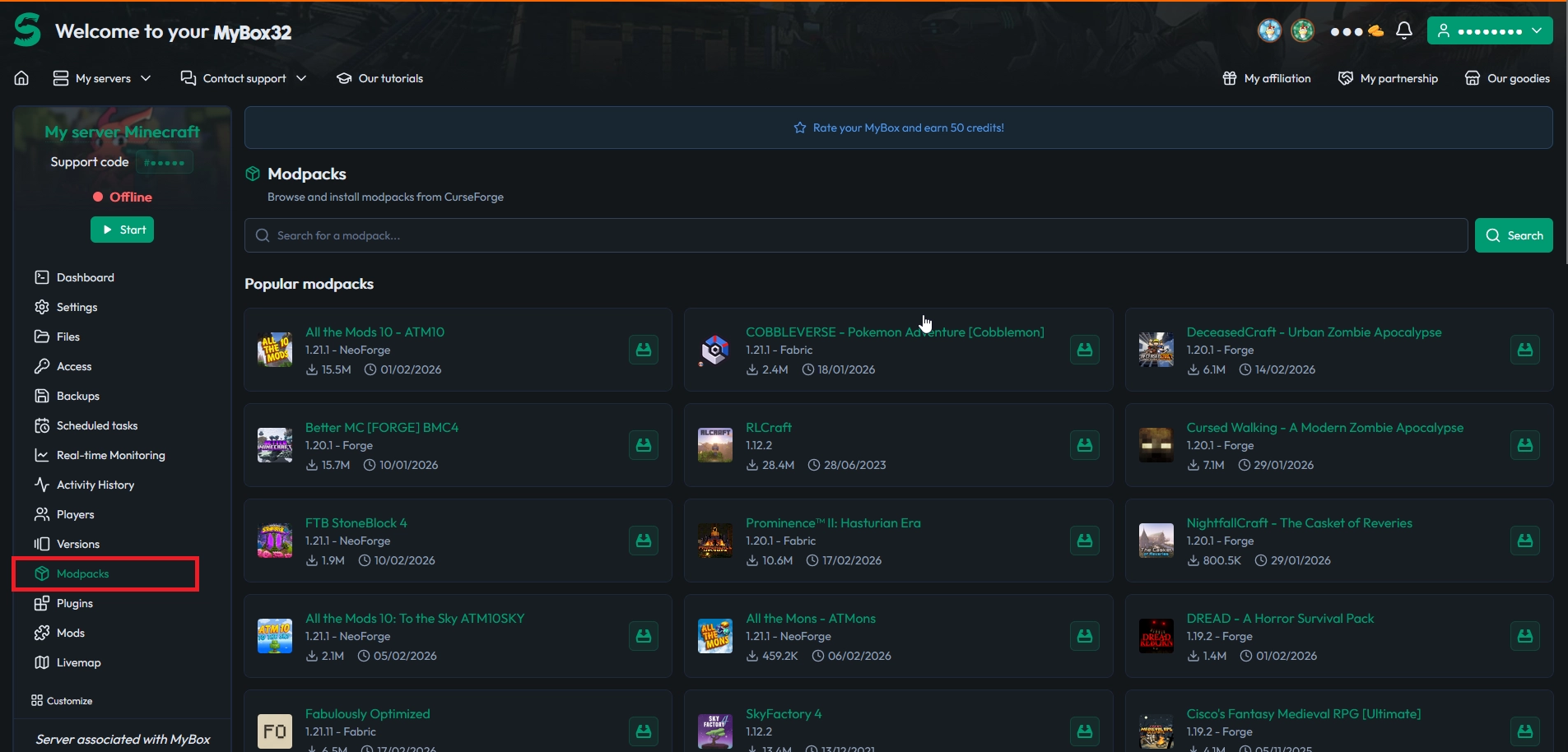
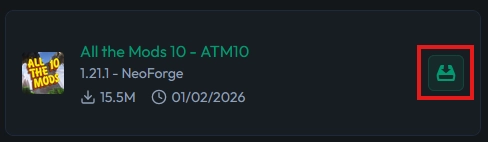
Search for your modpack (popular ones are highlighted), then click the Install button once you find it.
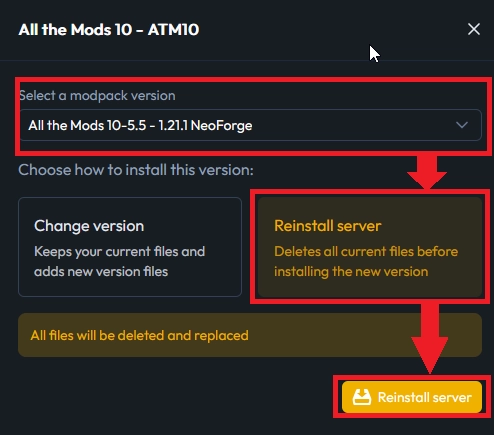
Select the modpack version, make sure it matches your client, then click Reinstall the server to launch the installation.
You’ll be redirected to the Dashboard. Wait for the installation to finish, then start the server.
📝 Note: The catalog covers public modpacks (available on CurseForge). If your pack doesn’t show up, it may be private or not indexed.
Install NeoForge from the Versions tab
Want a clean NeoForge base to build your own custom mod list? The MineStrator panel lets you install NeoForge in a few clicks, without using a pre-made modpack.
⚠️ Warning: Changing the server version triggers a reinstall. Back up your world in the Backups tab if needed.
Open the Versions tab
Select NeoForge in the server type list
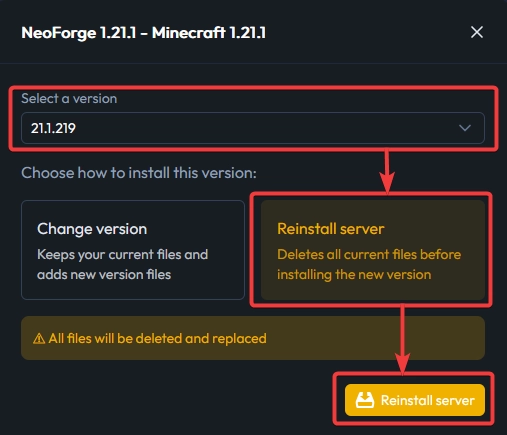
Pick the exact version, then click Reinstall this version
Follow the install in Console, then start the server
In the Versions tab, you’ll see all available server types (Vanilla, Forge, Fabric, NeoForge, etc.). Select NeoForge, then choose the version that matches the mods you want to run.
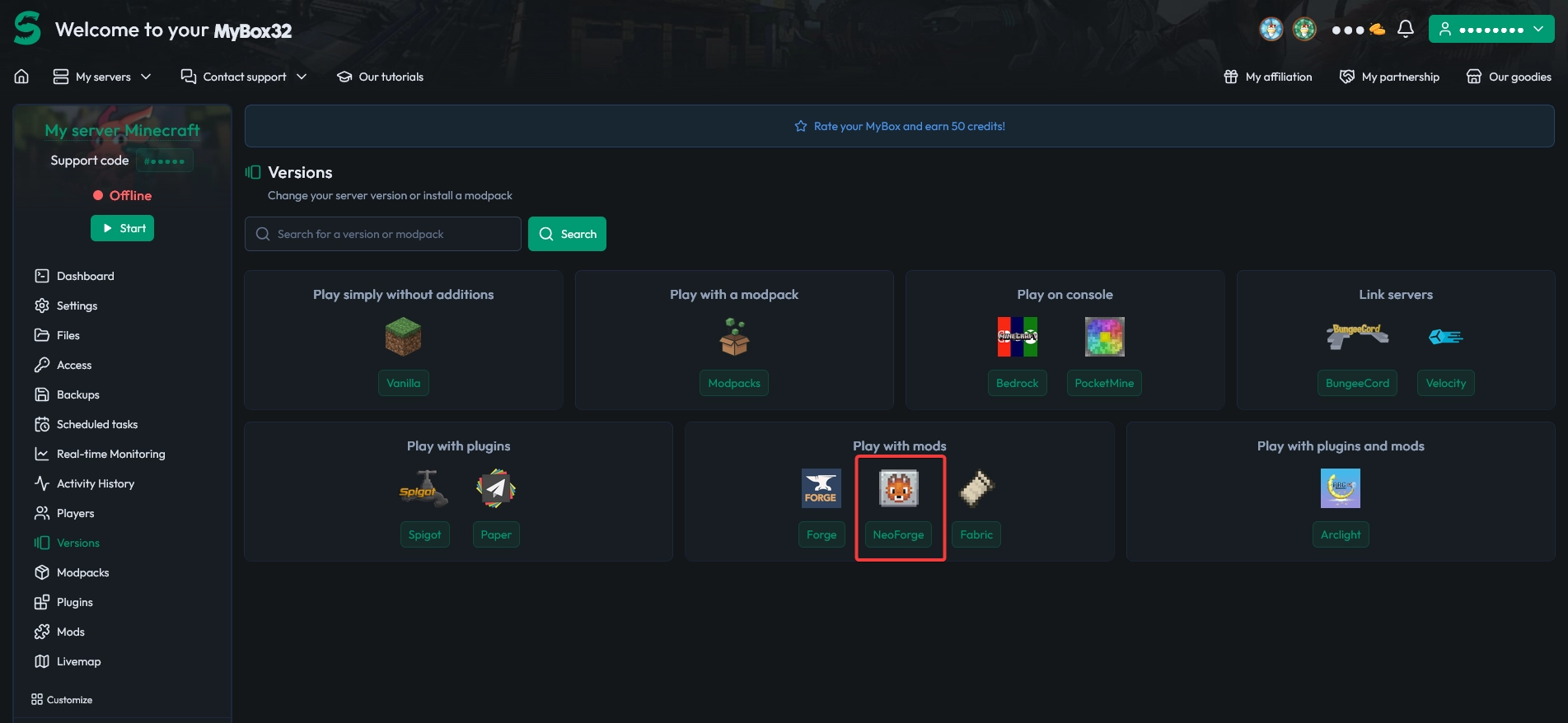
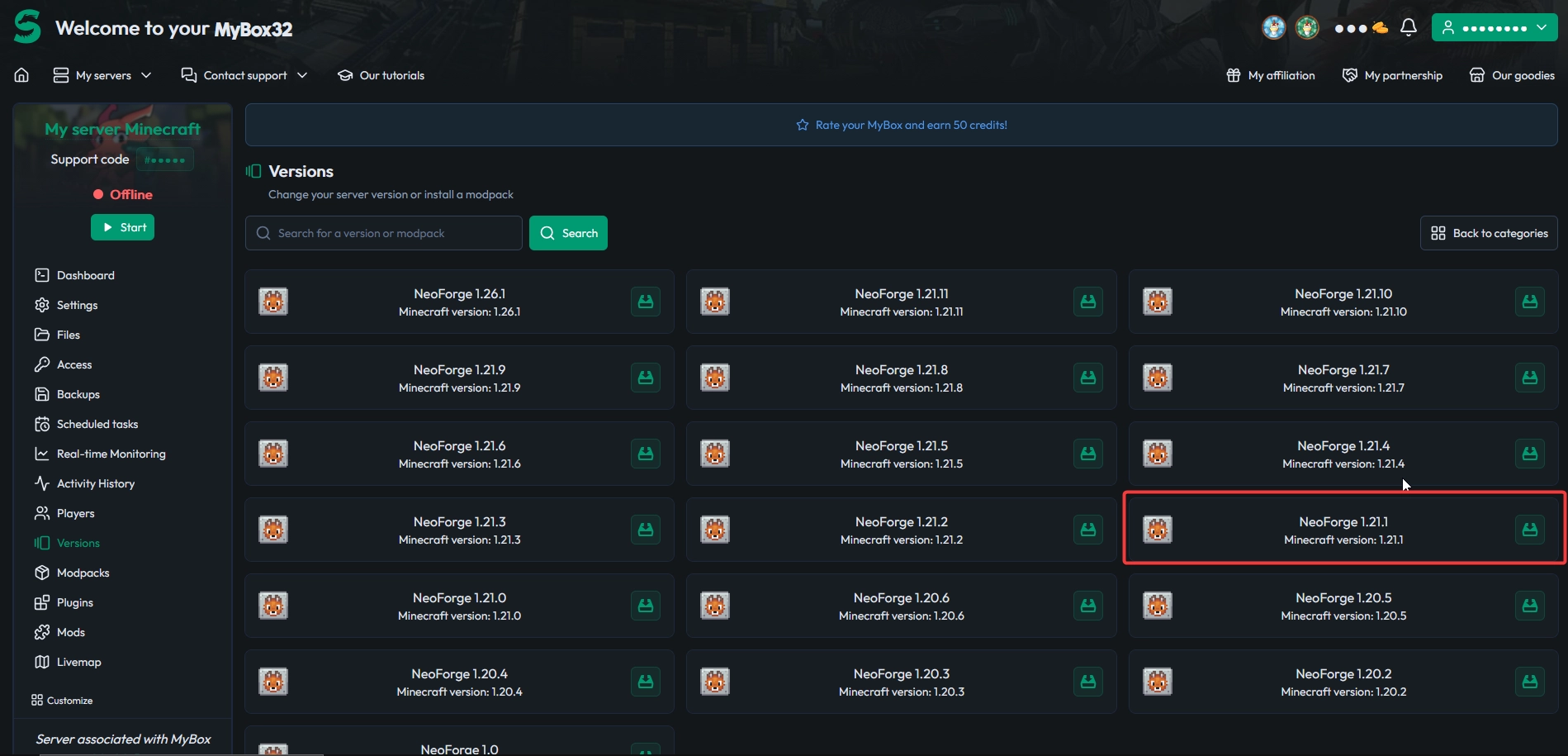
Click Reinstall this version to deploy the base, then monitor the installation in Console. When it finishes without errors, start your server.
📝 Note: The first boot of an “empty” NeoForge server is usually fast. After adding mods, startup often takes longer because everything in
/mods/must initialize.
Install compatible mods from the Mods tab
Once NeoForge is installed, you can add mods straight from the MineStrator panel, no manual upload needed. The Mods tab gives you a one-click catalog, but only if you set the filters correctly before you search.
⚠️ Warning: Installing a mod for the wrong Minecraft version or the wrong modloader almost always causes a startup crash. Set your filters before installing anything.
Open the Mods tab
Set the Minecraft version filter and the modloader filter to NeoForge
Switch between Modrinth and CurseForge to find mods (some are exclusive)
Search the mod, click Install, choose a version, then confirm Install
Restart the server to load the mod
In the Mods tab, start by entering your Minecraft version (for example 1.21.1) and selecting NeoForge as the modloader.
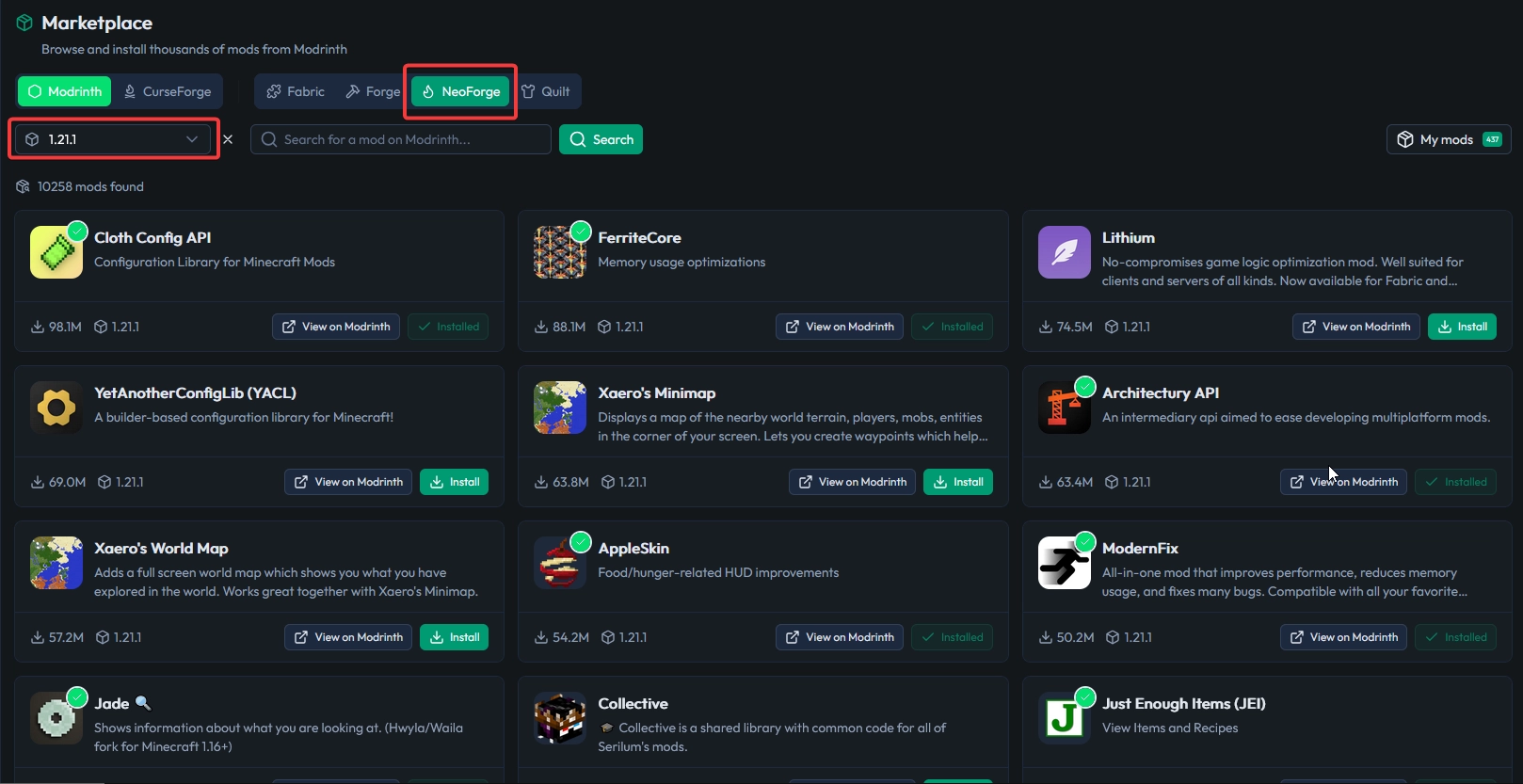
After filtering, find the mod you want and click Install. The .jar is automatically placed in /mods/. Then restart from the Dashboard so NeoForge loads it on boot.
💡 Tip: Install FerriteCore first. Its memory savings are often more noticeable as you add the rest of the pack.
Migrate from Forge to NeoForge safely
If you already run a Forge server, keep one rule in mind: most of the time, this isn’t a migration, it’s a rebuild. Even if NeoForge comes from Forge, real compatibility depends on your Minecraft version and whether your mods exist for NeoForge.
The most reliable method is to start from a clean NeoForge base (or a NeoForge modpack), then rebuild your setup. Trying to “force” unported Forge mods usually ends in random crashes or weird bugs that are painful to reproduce.
Fix NeoForge crashes and lag
When things break, the goal is fast diagnosis, not random mod removal. The most common causes are a wrong NeoForge version, an incompatible mod, or server overload (high MSPT).
Instant crash with NullPointerException
Open the latest file in crash-reports/, then search for the first occurrence of Caused by:. That’s often where the guilty mod shows up (mod name, Java class, sometimes the mod ID). Remove that mod from /mods/ and restart to confirm.
Error “NeoForge required” on startup
This means a mod requires a newer NeoForge build than the one installed on your server. Here’s a typical example:
[ERROR] Mod mymod requires NeoForge 21.1.80 but found 21.1.72You have two clean options: update NeoForge to the requested version, or install a mod version compatible with your current NeoForge. Either way, keep your pack consistent before rebooting, especially when multiple mods have dependencies.
For deeper lag investigations, use our Spark profiling guide to identify what’s actually eating your ticks.
Questions frequent
Can you use NeoForge with Bukkit/Spigot plugins?
Not directly. You’d need a hybrid loader (for example Mohist or Arclight), which can introduce incompatibilities and usually comes with more limited support. If you don’t have a strong reason to run plugins, stick to a “pure” modded server and look for mod alternatives.
What’s the difference between NeoForge and NeoForged?
NeoForged is the organization (the team). NeoForge is the modloader they develop. In everyday talk, people mix both, but for GitHub and documentation searches, “NeoForged” is often the better keyword.
How long does the first boot of a big pack take?
Expect around 1 to 2 minutes for 200 to 400 mods, depending on hardware and load. Later boots are usually faster thanks to caches and already-downloaded libraries.
Where should you download NeoForge mods safely?
Stick to trusted platforms like Modrinth and CurseForge. Always verify the Minecraft version and modloader on the mod page before installing.
Conclusion
In 2026, NeoForge isn’t an “alternative pick” anymore. It’s a rock-solid base for hosting a modern modded Minecraft server, especially if you play ambitious modpacks. Choose the right version, match your resources to your pack, and use a simple diagnostic routine, and you’ll avoid most of the classic “why is it crashing?” headaches.
Don’t have a server yet? Try it free for 12 hours, no credit card required, and install your NeoForge modpack in a few clicks from the MineStrator panel. For more modded Minecraft tips, browse our blog articles.

 22 February 2026
  Enjoy 10% off your first month of server with MineStrator using the code ACTU10!