Your goal is simple: install ATM10 on a MineStrator server, let it complete the first (longer) boot, then install the exact same ATM10 version on your PC. Do that, and you’ll avoid the classic “missing mods” or loader mismatch errors that block you at the door.
In this 2026 guide, you’ll learn what All the Mods 10 (ATM10) really is, how its progression works, which mods shape the experience, and the cleanest way to deploy it on MineStrator without breaking your existing world.
If you also care about performance and troubleshooting, you can pair this guide with our Spark lag diagnosis guide (2026) to keep your modded server smooth when the factories start multiplying.
Install ATM10 on a MineStrator server
Installing ATM10 on a MineStrator server is done directly from your panel via the Modpacks tab. The key is to deploy the pack first, start the server once to generate configs, and only then join with a client running the same ATM10 release (same modpack version, same loader).
This “server first, client second” workflow saves you from most headaches: wrong dependencies, missing mods, and those lovely red error screens that appear when your client and server aren’t perfectly synced.
🚨 Important: With modpacks, “close enough” is not enough. If your server runs ATM10 version X, your client must run ATM10 version X too.
What is ATM10 exactly?
All the Mods 10 (ATM10) is a huge, long-term survival modpack built around quests, progression, and a real endgame. In most releases, it bundles 400+ mods, mixing tech, magic, exploration, automation, and quality-of-life features into one “do everything” sandbox.
ATM10 runs on Minecraft 1.21 with NeoForge. That matters because your client must use the same loader, and some mods (and performance behavior) differ from older Forge/Fabric ecosystems.
What makes ATM10 beginner-friendly is the quest book: it acts like an in-game tutorial, guiding you through milestones and rewarding you with items that speed up the grind without skipping the fun.
Understand ATM10 progression and gameplay
ATM10 progression is flexible: you can go full engineer, become a wizard, explore dimensions, or build an automated farm empire. The quest lines give structure, but they don’t lock you into a single path, which is perfect for multiplayer servers where each player has their own obsession.
Because it combines hundreds of systems, ATM10 easily provides dozens to hundreds of hours of content depending on your pace, your group size, and how deep you go into automation and endgame crafting.
Main gameplay pillars you’ll typically focus on:
Technology automation: machines, power, logistics
Magic progression: enchants, loot, alternative resources
Gear and QoL: faster mining, building, utilities
Exploration: structures, bosses, dimensions
💬 Good to know: On a multiplayer ATM10 server, splitting roles (tech vs magic vs exploration) speeds up progression massively.
Key mods that define ATM10
ATM10’s flagship mods span technology, magic, logistics, building, and adventure. The exact lineup can shift from one release to another, but ATM10 typically combines modern “pillar” mods with newer additions to keep the gameplay feeling fresh.
Which tech mods should you use for industry?
The Mekanism mod is a core technology pillar in ATM10, offering ore processing (up to x5 depending on your setup), power generation (wind, solar, then fusion), and advanced gear. The Create mod brings a more “hands-on” style of automation with gears, shafts, belts, and kinetic machines. The Powah mod and the Modern Industrialization mod often round out power generation and machine options to help you optimize your factories.
Which mods handle logistics and transport?
Logistics in ATM10 relies on scalable ways to move items, fluids, and energy across large bases. The Pipez mod, the Pretty Pipes mod, the Modular Routers mod, and the Mekanism networks are commonly used to automate at scale and minimize manual handling.
Which magic mods offer an alternative progression path?
Magic in ATM10 provides a full progression track alongside tech. The Apotheosis mod takes enchanting further with rarities, powerful loot, and an RPG-style progression loop. The Mystical Agriculture mod lets you grow resources through crops, enabling a “magic-first” route to advanced materials without relying only on mining.
Which mods improve gear and quality of life?
The QoL mods in ATM10 make building and farming much faster. The Silent Gear mod helps you craft custom tools, the Mining Gadgets mod adds advanced mining tools, the Building Gadgets mod speeds up construction, and the Just Dire Things mod provides practical utility gadgets. Together, these mods make it realistic to build a massive base without placing every block by hand.
Which mods expand exploration and adventure?
ATM10 boosts exploration with new structures, extra biomes, and a deeper fishing system via the Aquaculture 2 mod. The Twilight Forest mod adds a dedicated dimension, and some releases also include mining- and boss-focused dimensions. The Ender’s Cataclysm mod is a key reference for tougher dungeons and more technical combat, with rare loot as the payoff.
Install ATM10 from the Modpacks tab
On MineStrator, ATM10 installation is handled in your panel under the Modpacks tab. Search for All The Mods 10, select it, then start the installation process.
To avoid conflicts with old files, pick the latest available version and run a reinstall. This ensures you get a clean server structure and the correct loader setup for ATM10.
⚠️ Warning: Reinstalling wipes your server. Backup your world and configs first using a Snapshot in the Backups tab, then restore or download it later if needed.
First boot: start the server and verify it’s online
The first startup of an ATM10 server is slower than vanilla because the modpack must generate configs, caches, and initial data. With 400+ mods, it’s normal for the first boot to take over a minute depending on load and hardware.
Open your MineStrator console and watch the logs. Your ATM10 server is ready when the status switches to online and the console stops scrolling continuous loading steps. Once it’s marked accessible, you can connect and begin your survival run.
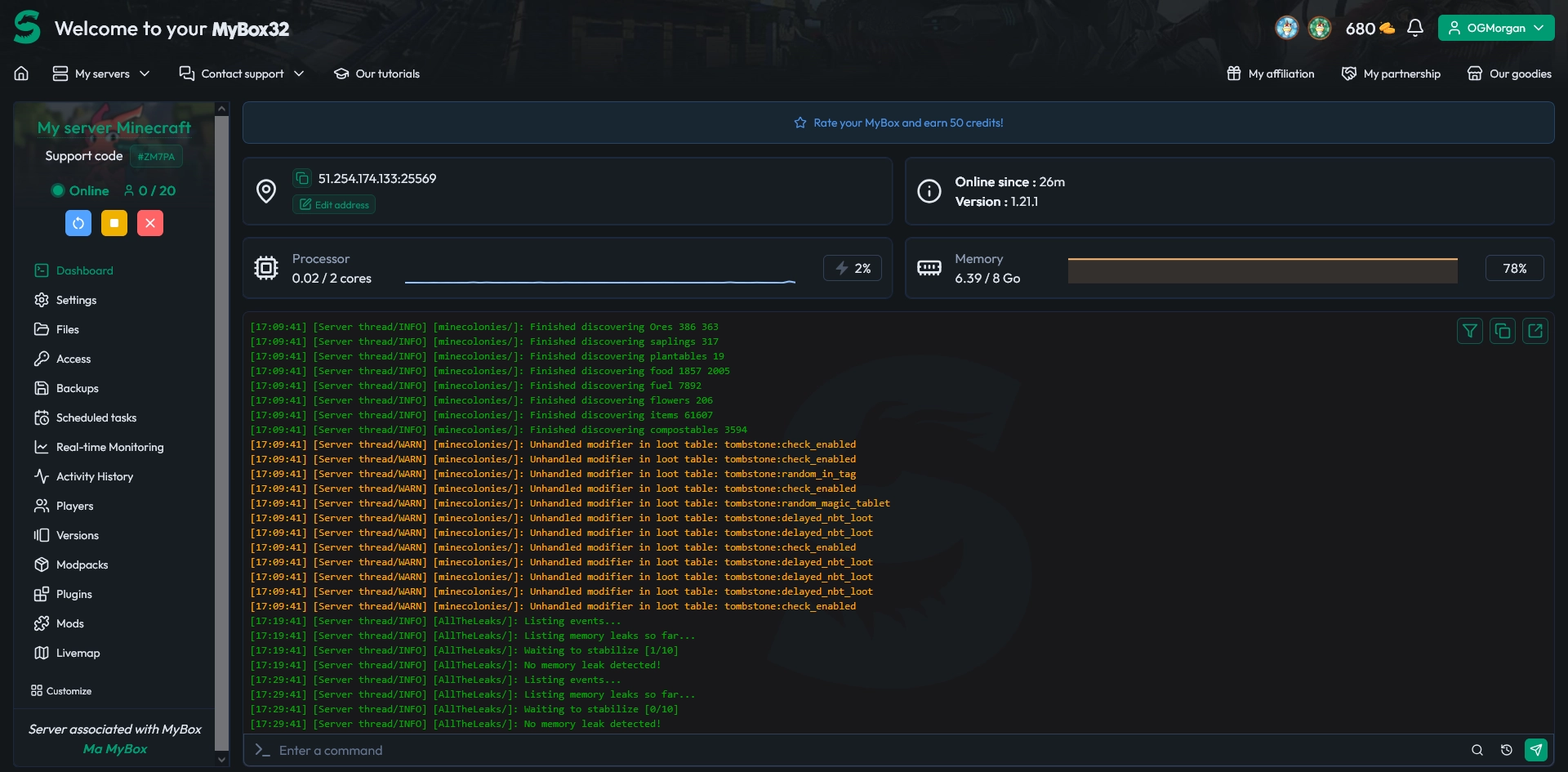
📝 Note: The first boot is almost always the longest. Next restarts are usually faster once everything is generated.
Install ATM10 on your client (required)
To join an ATM10 server, your client must run the exact same modpack, the same version, and the same loader. A vanilla client or a different ATM10 release will trigger common errors like “missing mods”, incompatible versions, or missing dependencies.
The easiest method is using CurseForge or Modrinth, which automatically downloads the correct files and creates a dedicated profile. Install ATM10 in the app, then launch Minecraft using the All The Mods 10 profile it generates.
💡 Tip: After any server update, check the modpack version on the panel and make every player update their client to match before logging in.
ATM10 variants you can try
ATM10 variants keep the All The Mods vibe but change the pace and progression style. If your group gets bored of classic survival, a variant can feel like a fresh season without leaving the ATM universe.
ATM10SKY: All The Mods 10: To The Sky, the Skyblock-ready version of ATM10, with new mods and quests to let you thrive on your flying island
ATMons: All The Mods 10 x Cobblemon, just try not to start a trainers duel in front of your brand new nuclear reactor, what could go wrong?
ATM10: the full “classic” experience, because that's already a lot
Which MyBox should you choose for ATM10?
ATM10 is a very resource-hungry modpack. If you’re only a few players, a MyBox 8 can work at first, but you may start to feel limited over time. As your server grows, your farms and machines will naturally require more resources than they did at the beginning.
For that reason, don’t hesitate to consider a MyBox 12 right away: it gives you more headroom and a smoother experience. To play comfortably and get the best out of the modpack, we recommend the Perf range, which is naturally better suited to large modpacks.
If you’re unsure, feel free to check our interactive buying guide: it will suggest an estimate based on your answers.
Questions frequent about ATM10
Why can’t I join my ATM10 server?
A failed connection on ATM10 is almost always a mismatch: wrong modpack, wrong version, or wrong loader. Install ATM10 through CurseForge/Modrinth and verify that your client modpack version matches the server exactly.
Is a very long first server start normal?
Yes. A long first boot on ATM10 is expected because the pack generates many files (configs, caches, mod initialization). As long as the console keeps progressing and isn’t stuck looping on an error, let it finish.
Does ATM10 require a lot of resources?
ATM10 is a heavy modpack. Load increases with player count, explored chunks, and automation density. For a smoother experience, avoid stacking too many machines in one area and monitor performance when your base starts scaling.
Conclusion
Your ATM10 server is ready when the modpack is installed from the Modpacks tab, the first boot completes, and your client runs the same ATM10 version. With its huge mod list and real endgame, All the Mods 10 is built for long, rewarding survival sessions with friends.
Don’t have a server yet? Try it free for 12 hours, no credit card required, and launch your ATM10 adventure in minutes. Want more hosting tips for 2026? Browse our other blog articles and level up your server setup.

 22 February 2026
  Enjoy 10% off your first month of server with MineStrator using the code ACTU10!