Steam Workshop mods can completely change how ARK: Survival Evolved feels on a dedicated server. New creatures, smarter building systems, quality-of-life tools, and full-on automation: the ARK Workshop (app ID 346110) is packed with community creations, and it’s a huge reason why ASE servers stay fresh in 2026.
Installing Steam Workshop mods on your MineStrator ARK server isn’t hard, but it does require the right method. Between grabbing the correct mod IDs, editing GameUserSettings.ini, respecting load order, and handling updates, a few small mistakes can lead to crashes or weird conflicts.
In this guide, you’ll learn how to install, configure, and maintain ARK: Survival Evolved mods on MineStrator, either using the MineBoard panel or by editing the config manually.
Why install ARK Survival Evolved mods?
Installing ARK Survival Evolved mods lets you tailor your server to your community instead of running a “default” survival experience. Better building, cleaner UI, new progression loops, or just less grind: mods help you create a server identity players remember.
Whether you only want Structures Plus (S+) for smoother building or you’re planning a full modpack, the logic stays the same. Your server downloads mods from Steam Workshop at startup, as long as the mod IDs are configured correctly.

Prerequisites before installing mods
Before you start installing ARK Steam Workshop mods, take two minutes to validate the basics. It’ll save you a lot of “why is my server stuck on startup?” later.
A working ARK: Survival Evolved dedicated server
Mods made for ASE (Workshop app 346110)
Enough disk space and RAM for downloads
A backup before major changes
⚠️ Warning: ARK: Survival Ascended (ASA) mods are not compatible with ARK: Survival Evolved (ASE). Always verify the mod belongs to Workshop app 346110.
If you don’t have a server yet, follow our step-by-step setup guide: How to create an ARK Survival Evolved server on MineStrator (2026).
Mods also increase resource usage. As a rule of thumb, plan 1–2 GB extra RAM per 5–10 mods, depending on what you install. For a deeper sizing guide, check: How much RAM for an ARK Survival Evolved server in 2026?
💡 Tip: Start with 3–5 essential mods, then add more gradually. Troubleshooting is way easier when you change one thing at a time.
How do you find a mod ID on Steam Workshop?
To install a mod, you need its unique Workshop ID. It’s the number Steam uses to identify the mod, and it’s what your server downloads at startup.
Open the ARK: Survival Evolved Steam Workshop page.
Search for the mod you want (example: “Structures Plus”).
Open the mod page.
Copy the number after
?id=in the URL.
Example: in steamcommunity.com/sharedfiles/filedetails/?id=731604991, the mod ID is 731604991.
💬 Good to know: Some mods require dependencies. Steam lists them on the mod page, install those first and keep them early in your load order.
Pick a few “safe” starter mods
Not sure where to begin? These community favorites improve quality of life without turning ARK into a completely different game.
Structures Plus (S+): Better snapping, extra pieces, building tools
Dino Storage v2: Advanced dino storage and management
Awesome SpyGlass: Detailed creature stats and info
Super Structures: S+ alternative with extra options
Automated Ark: Automation for repetitive tasks
Once your base mod list is stable, you can expand into bigger content mods and full modpacks.
Method 1: Install mods via MineBoard
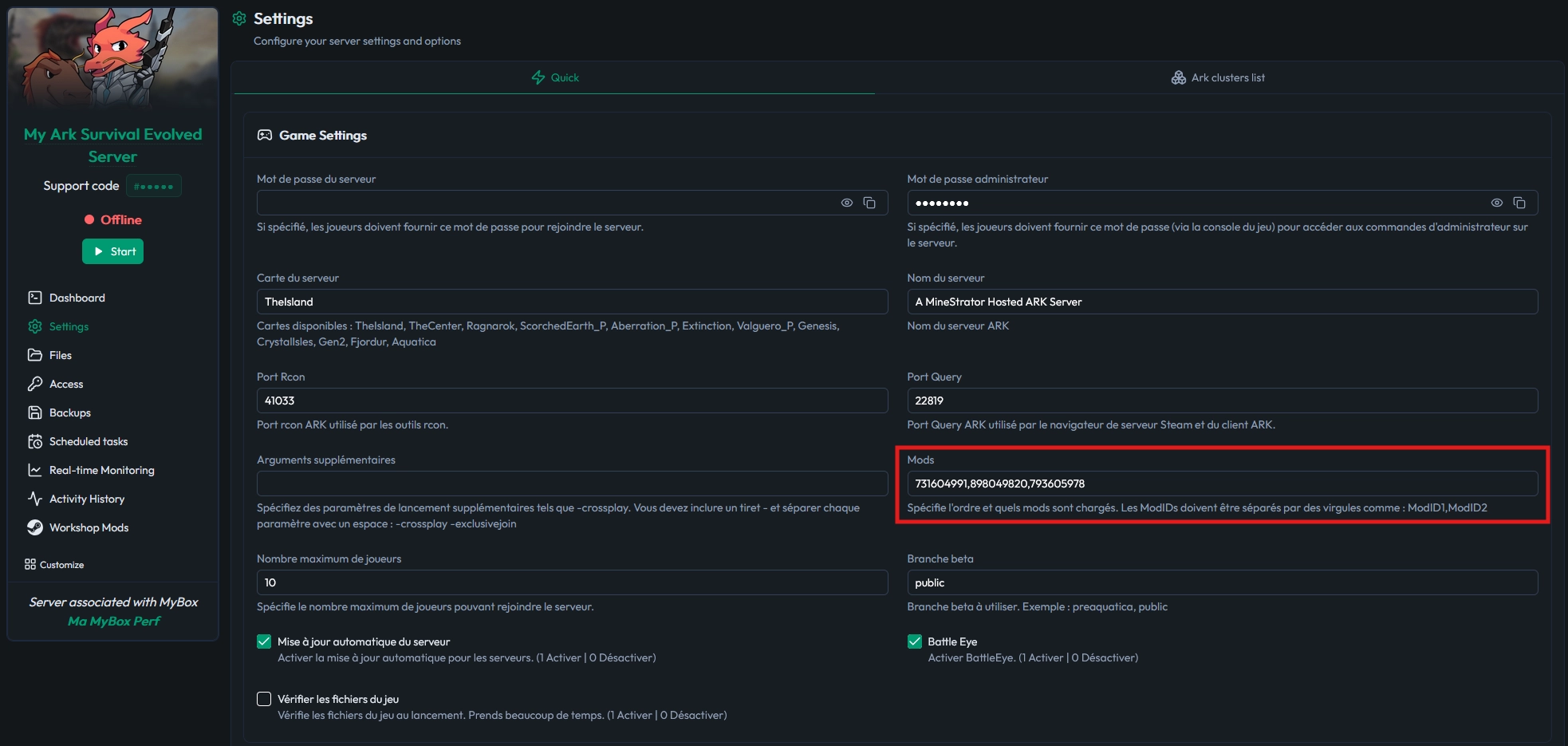
The easiest way to install ARK Survival Evolved mods on MineStrator is through the MineBoard panel. You don’t need to edit files manually, and it’s perfect for quick changes.
Log in to MineBoard and open your ARK: Survival Evolved server.
Go to your server settings.
Find the Mods or Steam Workshop section.
Paste your mod IDs (comma-separated), then save.
Restart the server to trigger the download and install.
🚨 Important: Mod load order matters. Put dependencies and “core” mods first, then mods that rely on them.
After saving, restart your server. On the next boot, ASE will download each mod from Steam Workshop. Download time depends on your list, since mods often weigh 50–500 MB each.
📝 Note: More mods = longer startup. With 10–15 mods, a few extra minutes on boot is normal.
Method 2: Install mods in GameUserSettings.ini
If you want more control, you can install ARK Steam Workshop mods manually by editing GameUserSettings.ini. This is also useful when you’re following a modpack guide that provides a fixed load order.
Open the MineBoard file manager and locate GameUserSettings.ini, usually here: ShooterGame/Saved/Config/LinuxServer/.
In the [ServerSettings] section, add (or edit) the ActiveMods line with your IDs separated by commas:
[ServerSettings]
ActiveMods=731604991,898049820,793605978
The order in ActiveMods is the load order. Save the file, then restart the server so it can download and load the mods. If you want to dial in other server parameters at the same time, take a look at our ARK Survival Evolved server settings guide for the full reference.
💡 Tip: Make a backup of
GameUserSettings.inibefore editing. If something breaks, you can rollback in seconds.
You can also enable mods using startup parameters with -mods=. Add this in MineBoard under startup settings if you want a temporary test without touching the config file:
-mods=731604991,898049820,793605978How do you confirm your mods are working?
After the restart, you should verify that your ARK Survival Evolved mods actually loaded. Don’t wait for players to report “connection failed” five minutes before prime time.
Check MineBoard startup logs for download and load messages per mod ID
Join the server in-game and confirm the mod list appears on connect
Watch for errors mentioning a specific mod ID
💬 Good to know: Players must have the same mods to join. Create a Steam Workshop collection for your server and share it, so they can subscribe in one click.
How to handle ARK mod updates, removals, and conflicts?
Installing mods is only step one. Keeping a modded ARK server stable means managing updates, avoiding risky removals, and troubleshooting conflicts fast.
Most mods update automatically on MineStrator when you restart the server. If you want the latest fixes, schedule regular restarts, especially after ARK or major mod updates.
To remove a mod, delete its ID from MineBoard or from ActiveMods in GameUserSettings.ini, then restart. Anything created by that mod (items, structures, dinos) can vanish or break, depending on the mod.
⚠️ Warning: Removing a building mod like Structures Plus (S+) can delete all structures made with it. Always back up and warn your players first.
If you suspect a conflict, use a simple diagnosis routine:
Add mods progressively, not all at once
Re-check load order and dependencies
Read the Workshop description and pinned comments
Use server logs to identify the failing mod ID
What are the best practices for a stable modded ARK server?
A modded server can be buttery smooth or an absolute chaos gremlin. These habits keep your ARK Survival Evolved server stable while still letting you push the gameplay.
Prefer fewer, well-maintained mods
Monitor RAM usage and upgrade when needed
Back up before adding or removing mods
Communicate changes to your community
Be careful after ARK updates and hotfixes
💡 Tip: Keep a single Steam Workshop collection for your server’s mod list. It reduces support questions and makes onboarding new players painless.
Frequently asked questions
What are ARK: Survival Evolved Workshop mods on a server?
ARK: Survival Evolved (ASE) Workshop mods are Steam Workshop add-ons (app ID 346110) that your dedicated server downloads and loads at startup using mod IDs. They can add new creatures, structures, UI, and gameplay systems without changing the base game files. At MineStrator, we recommend starting with 3–5 well-maintained mods to keep stability high in 2026.
How do I install Steam Workshop mods on an ARK server?
Steam Workshop mods install on an ARK: Survival Evolved server by adding the correct mod IDs to the server’s mod list and restarting so the server downloads them. You can do this via MineBoard (paste comma-separated IDs in the Mods/Workshop section) or manually by setting ActiveMods=ID1,ID2 in GameUserSettings.ini. In our MineStrator tests, most mods are 50–500 MB each, so first boot after adding mods can take several minutes.
Where do I find the mod ID for ARK: Survival Evolved mods?
The ARK: Survival Evolved mod ID is the number after ?id= on the Steam Workshop mod page URL. For example, steamcommunity.com/sharedfiles/filedetails/?id=731604991 has the mod ID 731604991. MineStrator experts also recommend checking the mod page for required dependencies and placing those dependency IDs first in the load order.
What RAM is recommended for an ARK server with 10 Workshop mods?
An ARK: Survival Evolved server with ~10 Workshop mods typically needs 2–4 GB extra RAM on top of your base server requirement, depending on mod size and complexity. A practical 2026 rule we use at MineStrator is +1–2 GB RAM per 5–10 mods, then monitor usage and upgrade if you see swapping or crashes. Heavier building and automation mods usually push RAM needs higher than simple QoL mods.
Why is my ARK server stuck on startup after adding mods?
An ARK: Survival Evolved server is often stuck on startup after adding mods due to a bad mod ID, missing dependency, wrong load order, or a large Workshop download still in progress. Fix it by (1) verifying every ID belongs to ASE Workshop app 346110, (2) putting dependencies first in ActiveMods, and (3) checking startup logs for the failing mod ID. At MineStrator, we also recommend removing mods one by one to isolate the conflict and restarting between each change.
Conclusion
Installing Steam Workshop mods on ARK Survival Evolved is the fastest way to build a unique server experience in 2026. Grab the correct Workshop IDs (app 346110), respect load order, and install either via MineBoard or with ActiveMods in GameUserSettings.ini.
Browse the full MineStrator ARK: Survival Evolved hosting offer when you’re ready to launch a long-term modded server.
Want to test your mod list without stress? Try it free for 12 hours, then fine-tune your ARK server until it’s exactly the experience your players want.

 18 May 2026
  Enjoy 10% off your first month of server with MineStrator using the code ACTU10!