



 MineStrator
ARK: Survival Evolved is still one of the biggest multiplayer survival games in 2026. It runs on Unreal Engine 4, so it’s generally less demanding than ARK: Survival Ascended, but that doesn’t mean any random setup will work. Too little RAM and your server will stutter, save slowly, or straight-up crash. Too much RAM and you’re paying for power you’ll never use.
The tricky part is that RAM needs change a lot depending on your server style: player count, Steam Workshop mods, the map you run, and how many tames your community hoards. That’s why “just get 8 GB” advice is often misleading.
This guide gives you clear, numbers-based recommendations to size the RAM for an ARK Survival Evolved server in 2026, whether you’re playing with friends or running a long-term community server.
ARK server RAM: why it matters
RAM is what keeps your ARK server stable under load. It holds the live world state: the map, connected players, bases, inventories, tamed dinos, and loaded mods. When memory gets saturated, you’ll see lag spikes first, then freezes, and finally a crash.
On Unreal Engine 4, the baseline memory footprint is “reasonable”… for ARK standards. A fresh server on The Island typically starts a bit above 6 GB of RAM even before players connect. That’s your practical minimum, not a “nice to have”.
From there, everything you add increases RAM usage: more players, more structures, more tames, and especially mods. If you understand these factors, you can pick the right amount of RAM without under-sizing or overpaying.
[Image a update]
What increases RAM usage on ARK
Before choosing a plan, it helps to know what actually eats memory on an ARK Survival Evolved server. These are the usual suspects, and they stack together.
Player count (online at the same time)
Each connected player adds memory load: position updates, inventory, nearby creatures, building interactions, and streaming data. The growth isn’t perfectly linear, but the trend is simple: more concurrent players means more RAM pressure.
Bases and structures
Player structures are persistent and costly, especially on older servers. A brand-new server with a few huts won’t behave like a 3‑month community server full of mega-bases and abandoned outposts. This is one of the most underestimated RAM factors.
Tamed dinos (the real RAM boss)
Tames stay in memory even when their owners are offline. If your players collect dozens (or hundreds) of creatures each, RAM usage can balloon fast. Your best control lever is TamedDinoLimit in Game.ini.
💡 Tip: Set
TamedDinoLimitto a realistic value (for example, 4000-5000 for a community server). This limit is global for the whole server, and it prevents “tame inflation” from slowly nuking your RAM.
Steam Workshop mods
Most ARK mods add roughly 50 to 200 MB of RAM each, depending on complexity. With 15-20 active mods, the total adds up quickly. Mods that add creatures, systems, or large structure sets usually hit the hardest.
The map you run
Not all ARK maps have the same memory footprint. Use The Island as the baseline, then adjust:
The Island: lightest baseline reference
Ragnarok, Crystal Isles, The Center: +500 MB to +1 GB
Extinction, Genesis Part 1 & 2: +2 to +4 GB
💬 Good to know: Coming from Minecraft hosting? A comparable ARK server usually needs more RAM. For context, see our complete Minecraft server RAM guide (2026).
Recommended RAM by server size (2026)
These recommendations are based on common 2026 setups and community feedback. Values assume The Island; add extra RAM for heavier maps (see above).
Vanilla server (no mods)
Players | Recommended RAM |
|---|---|
1 to 5 (private session) | 8 GB |
5 to 10 | 10 to 12 GB |
10 to 20 | 12 to 14 GB |
20 to 30 | 16 GB+ |
30+ | 20 GB+ |
Modded server (Workshop enabled)
For a modded server, plan a few extra GB compared to vanilla for the same player count. The exact number depends on your mod list, especially if you run creature packs or total conversions.
🚨 Important: These numbers assume dedicated RAM, not shared memory. On MineStrator, MyBox plans use dedicated RAM, so what you see in your panel is what your server actually gets.
Mods: how to estimate RAM impact
Mods are one of ARK’s best features, but they’re also a predictable RAM multiplier. The good news is that on Unreal Engine 4, the impact is usually manageable if you keep your list clean.
Light mods (50-100 MB each)
Quality-of-life mods like UI tweaks, stack mods, and many gameplay adjustments are relatively light. With around 5 light mods, expect roughly +300 to +500 MB total.
Heavy mods (100-200 MB each)
Creature packs, big systems (like storage ecosystems), overhaul mods, and total conversions cost more. With about 10 heavy mods, plan +1 to +2 GB on top of your vanilla baseline.
💡 Tip: Do a “mod spring cleaning” every few weeks. If you don’t use a mod anymore, remove it. An enabled mod can consume RAM permanently, even when nobody interacts with it.
Reduce RAM usage before upgrading
If your server is getting tight on memory, you don’t always need a bigger plan right away. A few smart settings can reduce RAM usage and improve stability, especially on long-running community servers.
Cap tames with TamedDinoLimit
Set TamedDinoLimit in Game.ini to keep tame counts under control. For a community server, 4000-5000 is a common range. For a private server with friends, 2000-3000 is often more than enough.
Set MaxPlayers to your real needs
MaxPlayers in GameUserSettings.ini influences how much capacity your server reserves. If you never exceed 15 concurrent players, don’t configure 70 slots “just in case”. Keeping it realistic helps prevent wasted resources.
Enable structure decay on PvE
On PvE servers, abandoned bases can pile up and bloat your world state. Use PvEStructureDecayPeriodMultiplier so inactive structures eventually disappear, keeping your server cleaner and lighter over time.
Schedule automatic restarts
ARK can accumulate memory leaks over long uptimes. A daily scheduled restart is a simple way to reset the server to a clean state. On MineStrator, you can set automatic restarts directly from your management panel.
📝 Note: If you want a broader view of hosting choices and stability, read our “host at home vs rent a server” comparison.
Dedicated vs shared RAM: the difference is huge
When comparing hosting offers, always check whether RAM is dedicated or shared. This detail can be the difference between a smooth server and a “why is it lagging today?” mystery.
With shared RAM, “8 GB” isn’t guaranteed. If other servers on the same machine spike, your ARK server can suffer: lag, slow saves, rubber-banding, or crashes during busy hours.
With dedicated RAM, like on MineStrator MyBox offers, your memory is reserved for your server only. If you pay for 12 GB, you actually have 12 GB available, even if the neighbors are going wild.

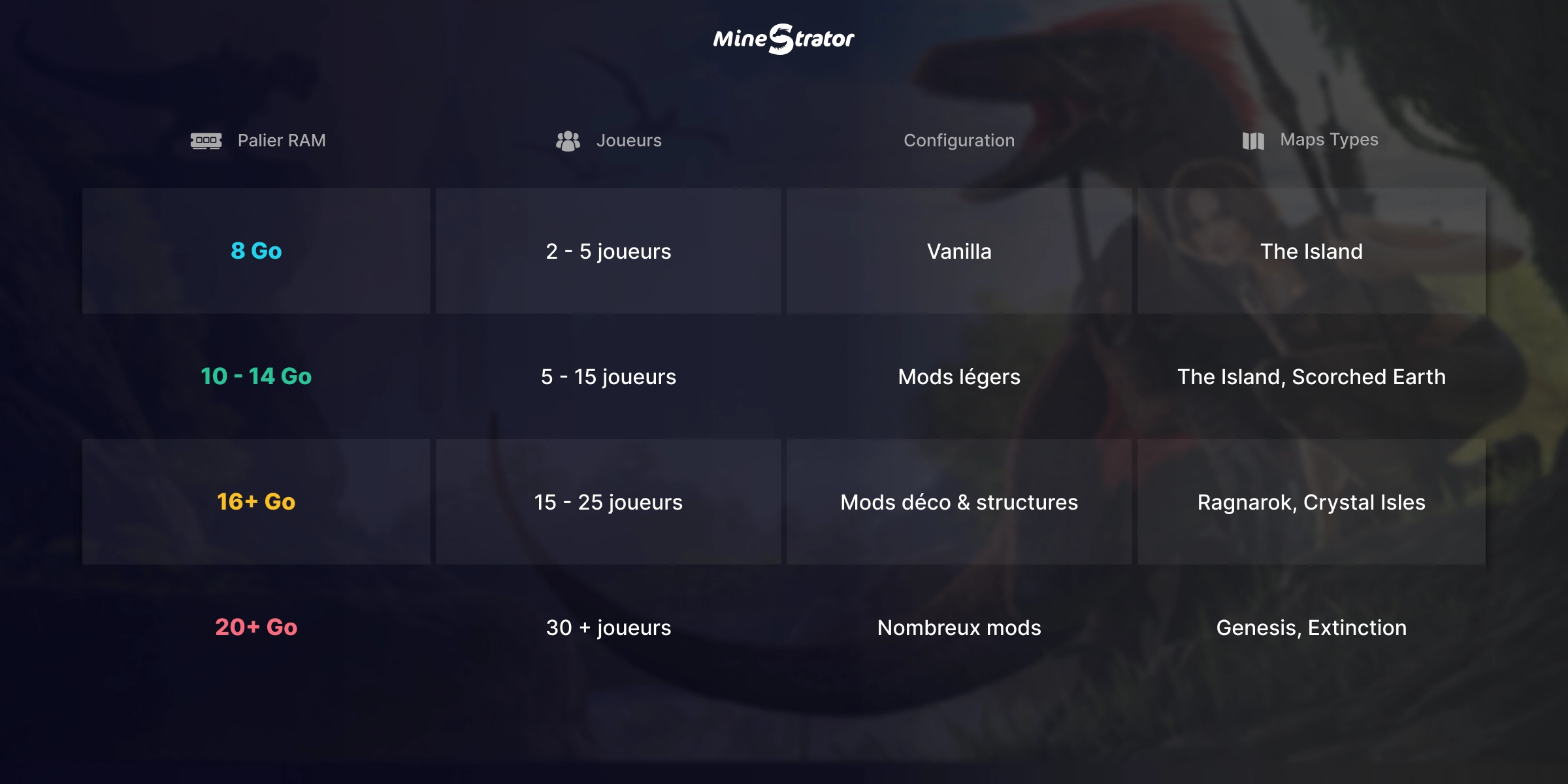
Which MineStrator plan should you pick?
Here’s a simple way to choose a MyBox plan for ARK Survival Evolved in 2026. Think of it as “start right, then scale when your tribe gets ambitious”.
MyBox 8: 2-5 friends, vanilla, The Island
MyBox 12: 5-15 players, a few light mods
MyBox 16: 15-25 players, mods, medium maps
MyBox 20+: 30+ players, many mods, heavy maps
The nice part is you can upgrade anytime if your server grows.
Frequently Asked Questions
Is 8 GB enough for an ARK server in 2026?
Yes for a small private server (2-5 players) on The Island with no or very few mods. If you run a community server, heavy maps, or multiple mods, 12 GB+ is usually safer.
Do mods always slow down the server?
Not always, but mods do increase RAM usage and can add CPU load depending on what they change. Creature packs, big structure mods, and overhaul mods are usually the most demanding.
Why does RAM usage increase over time?
As players build more bases and tame more dinos, the server keeps more persistent data active. Long uptimes can also amplify memory leaks, which is why scheduled restarts help.
Conclusion
Choosing the right RAM for an ARK Survival Evolved server in 2026 mainly depends on three things: concurrent players, your mod list, and the map. Unreal Engine 4 keeps ARK accessible compared to newer survival games, but you still want enough headroom to avoid crashes during peak hours.
Want the easy rule? Start with 8 GB, feel comfortable at 12 GB, and go big with 16 GB+. Don’t have a server yet? Try it free for 12 hours, no credit card required, and scale up when your tribe is ready.